

TL;DR:
- Automated at-risk account alerts leverage composite health scores to identify potential churn before escalation occurs.
- Combining signals from engagement, support, billing, and champion status enables timely, enriched notifications that trigger swift interventions.
Automated at-risk account alerts are defined as system-triggered notifications that fire when a customer's health score crosses a risk threshold, giving your customer success team time to intervene before churn becomes a done deal. The industry term for this practice is proactive churn management, and the mechanics behind it have matured fast. In 2026, the best SaaS teams are no longer waiting for a renewal conversation to discover a disengaged account. They automate at-risk account alerts by pulling signals from product usage, support tickets, billing changes, and champion status into a single composite score, then routing the right alert to the right person the moment risk appears.
How to automate at-risk account alerts with the right signals
The quality of your alert system depends entirely on the signals feeding it. A single data point, like a missed login, tells you almost nothing. A composite picture tells you everything.

The most reliable at-risk account notifications combine four signal categories into a weighted health score. Composite health scoring weights engagement at 40 points, support signals at 30 points, champion status at 20 points, and billing behavior at 10 points, customized per product-led or relationship-led account type. That weighting reflects how churn actually happens: disengagement is the loudest early signal, but a champion departure or a billing contraction can accelerate the timeline dramatically.
The four signal categories break down like this:
- Engagement signals: Week-over-week active users, feature adoption rate, login recency, and session depth. A 30% drop in weekly active users over two consecutive weeks is a reliable early warning.
- Support signals: Ticket volume, unresolved issue age, and severity escalations. SUPPORT_SPIKE combined with ENGAGEMENT_DECLINING is the highest-confidence churn predictor in automated workflows. When both signals appear together, treat it as a fire drill.
- Billing signals: Seat reductions, plan downgrades, failed payments, and cancellation requests. These are late-stage signals, but they confirm what engagement data already suggested.
- Champion signals: Weekly LinkedIn scraping compares a contact's current employer in LinkedIn against the CRM employer field, triggering an alert when a champion departs or changes roles. Champion departure is one of the most undermonitored churn signals in SaaS.
Once you aggregate these signals, your scoring model maps accounts to four buckets:
| Health bucket | Score range | Alert behavior |
|---|---|---|
| HEALTHY | 75–100 | No alert |
| MONITOR | 50–74 | Weekly digest flag |
| AT_RISK | 25–49 | Immediate CSM notification |
| CRITICAL | 0–24 | Escalation alert + playbook trigger |
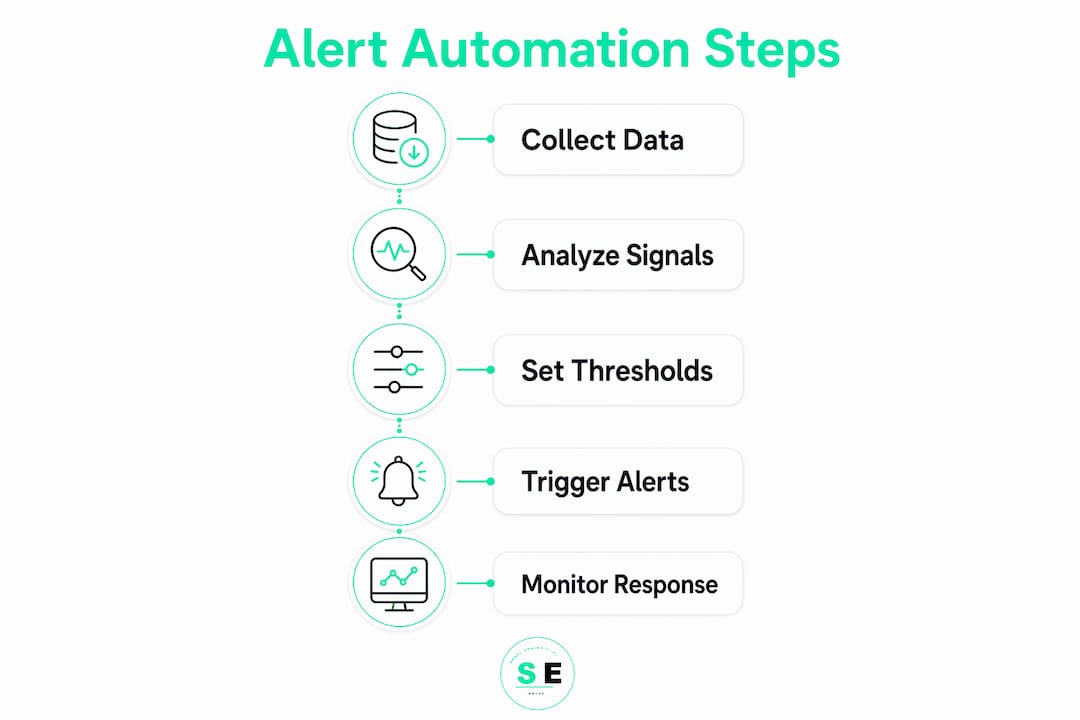
Alerts fire when a score drops below 25 or declines more than 15 points within 14 days. That 14-day window matters because gradual decline is easy to miss in a weekly review cycle but easy to catch with automated monitoring.
Which tools enable account alert automation at scale?
Knowing what to measure is half the battle. The other half is choosing the right stack to collect, score, and route those signals without requiring your team to babysit a dashboard.
Here is how the major tool categories fit together:
- Workflow orchestration: n8n and Zapier handle the logic layer. n8n is preferred for teams that need complex branching logic or on-premise data handling. Zapier works well for teams already using SaaS-native tools and wanting fast setup without engineering support.
- CRM platforms: Salesforce and HubSpot serve as the data backbone. Both expose APIs that let you read account health fields, write alert statuses, and trigger task creation automatically. Salesforce's Flow Builder and HubSpot's Workflows module can both fire internal notifications when a custom health score field crosses a threshold.
- AI intervention agents: The eZintegrations AI churn intervention agent retrieves account context, classifies the churn trigger, selects a playbook, drafts outreach, schedules an executive business review, and triggers discount approval workflows, all without waiting for manual review. This is the difference between an alert system and a full retention workflow engine.
- Alert delivery: Slack and Microsoft Teams are the standard delivery channels. Slack alert messages that include account name, renewal date, ARR, and explicit next-step instructions reduce triage time and give CSMs everything they need to act without opening a second tool.
- Champion monitoring: LinkedIn scraping APIs feed champion departure signals directly into your health score. This is a specialized layer, but it pays off for enterprise accounts where a single champion change can flip a renewal.
For teams evaluating Salesforce CRM integrations specifically, the key is mapping your health score fields to native Salesforce objects so that alert triggers fire through existing workflow rules rather than requiring a separate automation layer.
Pro Tip: Start with Slack as your alert delivery channel before building out a full dashboard. A well-formatted Slack message with five fields of context gets acted on faster than a CRM task that requires three clicks to find.
How to build automated alert workflows step by step
Building a working alert workflow takes less time than most CS leaders expect. The architecture is straightforward once you define your triggers, channels, and actions upfront.
-
Define your trigger conditions. Set alerts to fire when a composite health score drops below 25, when a score declines more than 15 points in 14 days, or when a champion departure is detected. Each trigger type maps to a different urgency level and a different response playbook.
-
Configure context enrichment. Every alert message should automatically pull account name, ARR, renewal date, the specific signals that triggered the alert, and the assigned CSM. Alerts without context create more work, not less. Your n8n or Zapier workflow should query your CRM API at the moment of trigger and inject these fields into the notification.
-
Route alerts to the right channel. CRITICAL alerts go directly to the CSM and their manager in Slack. AT_RISK alerts go to the CSM only. MONITOR flags roll up into a weekly leadership digest that summarizes CRITICAL and DECLINING accounts, champion departure flags, and the top highest-ARR accounts at risk. This digest eliminates the need for leadership to log into a dashboard to understand portfolio risk.
-
Attach playbook steps automatically. When a CRITICAL alert fires, the workflow should simultaneously create a CRM task for the CSM, draft an outreach email, and flag the account for discount approval review. Automated workflows trigger within 60 minutes of an ML churn model flag, cutting the lag between detection and action to near zero.
-
Monitor post-intervention health. Closing the loop is where most teams fall short. After an intervention fires, your system should track whether the account's health score recovers within 14 days. Post-intervention monitoring detects usage trend recovery, NPS score improvements, or stalled outcomes, and escalates again if recovery does not materialize.
-
Tune your thresholds quarterly. Review false positive rates and missed churn events every 90 days. If CSMs are ignoring alerts because they fire too often, your sensitivity is too high. If accounts are churning without triggering an alert, your thresholds are too conservative.
For a deeper look at the revenue metrics that feed these workflows, the guide on detecting lost revenue signals covers the data layer in detail.
What are the common pitfalls in automating risk alerts?
Alert fatigue is the fastest way to kill a well-built system. When CSMs receive 20 alerts a day and half of them require no action, they start ignoring all of them. Precision matters as much as recall.
The most effective teams follow these practices to keep their alert systems sharp:
- Set tiered urgency levels. Not every score drop is a fire. MONITOR-level accounts should surface in a digest, not as a direct ping. Reserve direct Slack notifications for AT_RISK and CRITICAL buckets only.
- Include explicit next actions in every alert. An alert that says "Account X health score dropped to 22" is less useful than one that says "Account X dropped to 22. Renewal in 47 days. ARR: $84K. Trigger: support spike + engagement decline. Recommended action: schedule discovery call this week." The second version requires zero additional research.
- Standardize your investigation workflow. Microsoft Purview Insider Risk Management uses a structured alert review process: review detection details, understand context, decide action. Borrowing this pattern for CS alert triage eliminates inconsistent manual interpretations across your team.
- Align alert volume to team capacity. If one CSM manages 80 accounts, a system that fires 15 alerts per day is not manageable. Calibrate alert frequency to what your team can realistically act on in a given week.
- Use AI to classify churn triggers. Not all churn looks the same. A support-driven churn risk needs a different playbook than a champion departure. AI classification at the alert stage means the right playbook fires automatically rather than leaving the CSM to diagnose the cause before acting.
Pro Tip: Run a 30-day retrospective after launching your alert system. Pull every account that churned and check whether an alert fired before the cancellation. If more than 20% of churns had no prior alert, your signal coverage has gaps.
You can also explore customer retention automation frameworks that complement alert-based workflows with broader lifecycle automation.
Key takeaways
Automating at-risk account alerts requires composite health scoring, enriched alert content, and post-intervention monitoring working together to catch and recover at-risk accounts before churn is finalized.
| Point | Details |
|---|---|
| Use composite health scoring | Weight engagement, support, champion, and billing signals to score accounts daily and trigger alerts at defined thresholds. |
| Enrich every alert with context | Include ARR, renewal date, trigger signals, and next-step instructions so CSMs act immediately without additional research. |
| Automate playbook execution | Connect alerts to outreach drafts, EBR scheduling, and discount approvals so intervention starts within 60 minutes of detection. |
| Monitor post-intervention recovery | Track health score changes for 14 days after intervention and escalate again if recovery stalls. |
| Prevent alert fatigue | Route MONITOR flags to weekly digests and reserve direct notifications for AT_RISK and CRITICAL accounts only. |
Why alert content beats alert volume every time
I have seen CS teams build technically impressive alert systems that their own reps stopped trusting within 60 days. The alerts fired on time. The scores were accurate. But the messages were bare: account name, score, timestamp. Nothing else. The CSMs had to open Salesforce, find the account, read the activity log, and then decide what to do. That lookup took 8 to 12 minutes per alert. With 10 alerts a day, that is two hours of triage before a single customer conversation happens.
The shift that actually moved the needle was not better scoring. It was richer alert messages. Once we added ARR, renewal date, the specific signal combination that triggered the alert, and a recommended next action, CSM response time dropped by more than half. The alerts became self-contained work orders rather than notifications requiring investigation.
The second lesson is about champion data. Most teams track product usage obsessively and ignore the human layer entirely. A champion departure at a $200K ARR account is a higher-priority signal than a 10-point score drop at a $20K account. Automated champion monitoring via LinkedIn APIs is one of the highest-ROI additions you can make to an existing alert system, and it is still underused by most teams.
The third lesson is that alerts without follow-through are just noise. True at-risk account automation acts as a full workflow engine: enrich, classify, select playbook, execute intervention, and monitor health outcomes. If your system stops at the notification step, you have built a smoke detector without a sprinkler system.
— Bernard
See automated risk alerts in action with Signalengine
Signalengine is built for SaaS teams and service businesses that need AI-powered early risk detection without a six-month implementation project. The platform connects your CRM, product usage data, and billing signals into a single health scoring engine, then fires enriched alerts to Slack or email the moment an account crosses a risk threshold.
You get automated outreach drafts, playbook triggers, and a 30-day recovery plan from day one. Setup takes minutes, not weeks. The average Signalengine user identifies $38K in recoverable revenue in the first month. If you want to see how the alert workflows look in practice, the live demo walks through a real at-risk account scenario from signal detection to intervention execution. For SaaS teams specifically, the Signal Engine for SaaS teams page covers the ML models and workflow configurations in detail.
Ready to Stop the Revenue Leak?
Signal Engine gives small and local businesses 31 AI-powered tools to score leads by buying intent, predict churn before it happens, auto-generate email and SMS campaigns, and recover missed calls automatically — all in one dashboard starting at $49/month.
Start your free 7-day trial — no credit card required. Setup takes 5 minutes.
FAQ
What is an automated at-risk account alert?
An automated at-risk account alert is a system-triggered notification that fires when a customer's composite health score drops below a defined threshold, signaling churn risk before the customer communicates dissatisfaction directly.
What signals should trigger at-risk account notifications?
The highest-confidence trigger is a combined support spike and engagement decline. Other reliable triggers include a health score drop below 25, a 15-point decline within 14 days, and champion departure detected via LinkedIn monitoring.
How fast should an alert system respond to a churn signal?
Automated workflows should trigger within 60 minutes of an ML churn model flag. Delays beyond a few hours reduce intervention effectiveness because the window for proactive outreach narrows quickly.
How do I prevent alert fatigue in my CS team?
Route MONITOR-level accounts to a weekly digest rather than direct notifications, and reserve real-time Slack alerts for AT_RISK and CRITICAL accounts only. Every alert should include explicit next-step instructions to eliminate manual triage time.
Which platforms support automated account monitoring workflows?
n8n and Zapier handle workflow orchestration. Salesforce and HubSpot serve as the CRM data layer. Slack and Microsoft Teams deliver enriched alert messages. AI agents like the eZintegrations churn intervention agent handle classification and playbook execution automatically.