

Lead scoring ranks your prospects by how likely they are to buy, so your team calls the hottest ones first instead of working the list top to bottom. You don't need a data science team or six months of setup. You need a spreadsheet or CRM field, three to five signals, and about 30 minutes.
Here's the fast version: open a spreadsheet or your CRM, add a "Lead Score" column, and start tracking these right now.
- Fit signals: company size, budget range, service area
- Intent signals: pricing page visits, demo requests, phone calls
- Engagement signals: email replies, repeat site visits, form completions
Assign each signal a point value, add them up, and sort your list high to low. Call the top scores first tomorrow morning. If you'd rather skip the spreadsheet entirely, Signal Engine automates this scoring in the background and flags your hottest leads without you lifting a finger.
TL;DR:
- Lead scoring should prioritize fit, intent, and engagement signals, with most small businesses using 3 to 8 criteria for simplicity and clarity.
- Assign point values based on whether a lead matches your ideal customer profile, shows active buying behavior, or demonstrates ongoing interest, and set thresholds for hot, warm, and cold leads.
- Focus on the highest-weighted signals such as company fit and active purchase actions before considering engagement details, adjusting scores with urgency and decay modifiers as needed.
- Use rule-based scoring models until generating at least 100 leads monthly, as predictive AI is unreliable at lower volumes due to noisy data and insufficient history.
- Automate lead routing and scoring updates with tools like Signal Engine once your model proves effective to save time and improve follow-up speed.
Table of Contents
- What Lead Scoring for Small Business Actually Means
- The Signals That Actually Predict a Sale
- How to Build a Lead Scoring System in Four Steps
- Copy These Scoring Templates for Your Business Type
- Rule-Based Scoring vs. Predictive AI: When to Switch
- Automating the Score Once You Have a System
- Measuring Whether Your Scoring Model Works
- Why I Tell Small Teams to Skip the Fancy Model
- Ready to Stop the Revenue Leak?
- Key Takeaways
- Where This Guide's Numbers Come From
- Sources
- FAQ
What Lead Scoring for Small Business Actually Means
Lead scoring combines three things: fit (does this prospect match your ideal customer), intent (are they showing buying behavior), and engagement (are they actually interacting with you). Add points for each, and you get a number that tells you who to call first.
For a small business, this translates directly into hours saved. A five-person sales team working 40 unscored leads a week wastes time calling tire kickers while a ready-to-buy prospect sits untouched for two days. Score those same 40 leads, and the top 8 to 10 jump to the front of the queue. SMB-focused guides consistently find that a simple fit-plus-intent-plus-engagement model, built with 3 to 8 criteria, works as well for a ten-person shop as a complex model works for an enterprise sales floor.
The payoff shows up in three places:
- Faster wins: your best-fit, highest-intent leads get called first, not whenever someone gets to them.
- Less busywork: reps stop chasing dead-end inquiries and spend that time on prospects who convert.
- Cleaner forecasting: a scored pipeline gives you a real read on how many deals are actually close to closing.
Simple systems are enough for most small businesses under a few hundred leads a month. You know your best customers, your sales cycle is short enough to spot patterns manually, and a spreadsheet or basic CRM field can hold the whole model. Complexity becomes worth it only once volume or team size outgrows what one person can track in their head, which is a threshold worth watching rather than assuming.
The Signals That Actually Predict a Sale
Not every signal deserves equal weight. Here's how to sort them, in the order they matter most for a small team.
- Fit signals you can grab in a contact form or a two-minute qualification call: company size, industry, service location, budget range, or job title. These answer "could this person ever become a customer?"
- Intent signals that reveal active buying behavior: pricing page visits, demo requests, the type of form submitted (a "request a quote" form beats a newsletter signup every time). Traffic source is often the single strongest predictor for small businesses — a lead from a Google search for your exact service usually outscores one who clicked a general blog post.
- Engagement signals that show ongoing interest: email replies, a second or third website visit, opening multiple emails in a sequence. One reply to a sales email is worth more than five opens with no response.
- Urgency and friction modifiers that adjust the score up or down: a stated timeline ("need this by next month") adds points, while a vague "just researching" note or a mismatched budget subtracts them. Adding urgency and friction as modifiers keeps a high-fit lead with zero urgency from crowding out someone ready to sign this week.
- Negative signals and score decay: a bounced email, an unsubscribe, or 30 days of silence should pull points back down. Without decay, your "hot" list fills up with leads who went cold two months ago and nobody noticed.
Pro Tip: Set an engagement floor that flags a lead as worth a look even before you've confirmed fit. A prospect who visits your pricing page three times in a week deserves a call, even if you haven't qualified their company size yet.
Weight fit and intent heaviest, since they answer "can they buy" and "are they trying to." Treat engagement as a supporting signal, and let urgency and decay push scores up or down at the margins. That order keeps the model simple enough for one person to maintain in a spreadsheet.
How to Build a Lead Scoring System in Four Steps
You can finish this in an afternoon. Here's the sequence that works whether you're running it in a Google Sheet or a CRM's custom fields.
Step 1: Choose your dimensions and criteria. Pick 5 to 8 criteria across fit, intent, and engagement. Don't grab 20 data points because you can. A stepwise build focused on fit, intent, urgency, and friction produces a model your whole team can explain in one sentence, which matters more than technical sophistication when you're the one running the sales calls.
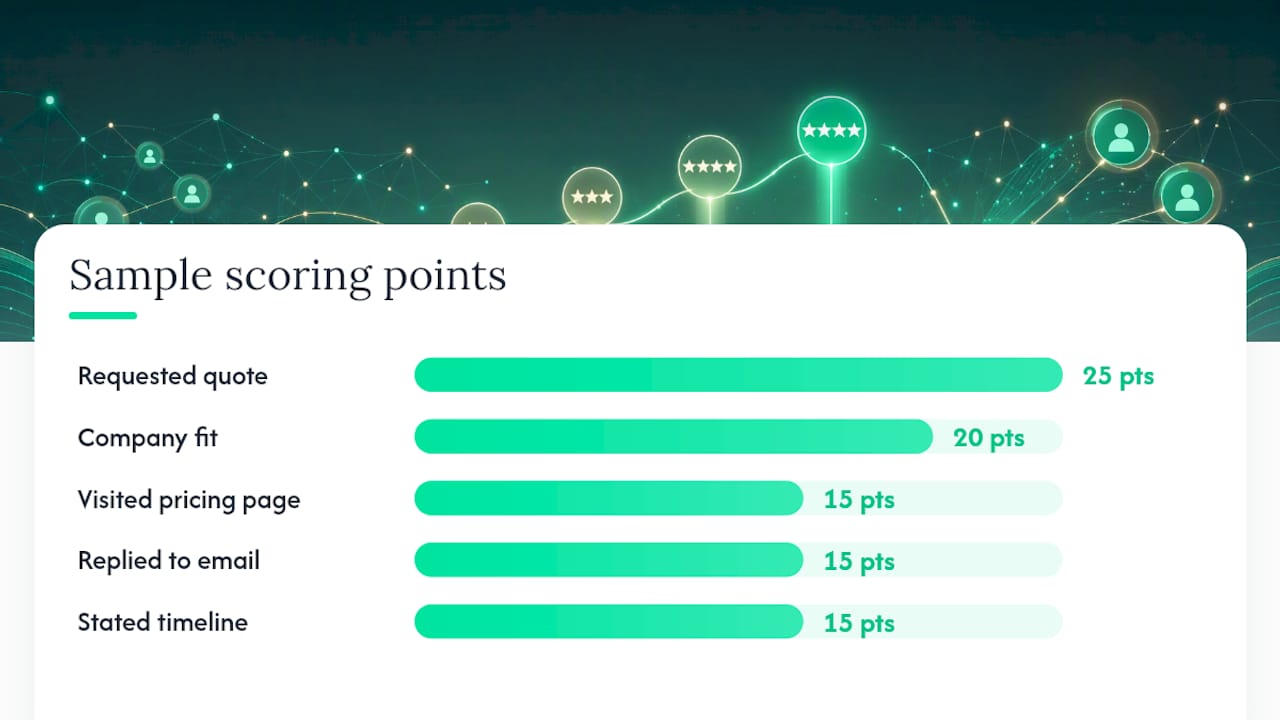
Step 2: Assign points and pick a scale. Most small businesses do fine on a 0 to 100 scale, though a 0 to 200 scale gives you more room if you're weighting several fit criteria heavily. Here's a sample matrix for a service business:
| Criterion | Points | Example trigger |
|---|---|---|
| Company/household fit | 20 | Matches ideal customer profile |
| Requested a quote | 25 | Filled out "get a quote" form |
| Visited pricing page 2+ times | 15 | Return visit within 7 days |
| Replied to an email | 15 | Any reply, positive or negative |
| Stated a timeline | 15 | "Need this by [date]" |
| No response in 30 days | negative 20 | Score decay trigger |
Step 3: Set thresholds and routing rules. Common SMB thresholds run 70 and above as hot, 40 to 69 as warm, and below 40 as cold. Attach a response rule to each band: call hot leads within 15 minutes, email warm leads same day, and drop cold leads into a nurture sequence. The speed matters as much as the score. A hot lead that sits for six hours behaves like a cold one.
Step 4: Run a look-back and recalibrate. Pull your last 60 to 90 days of closed deals and check whether your "hot" leads actually closed more often than your "warm" ones. If a criterion isn't correlating with closed deals, drop the points or reassign them. This step gets skipped constantly, and it's the one that keeps a scoring model from drifting into guesswork six months in.
Copy These Scoring Templates for Your Business Type
Different business models need different weighting. Here are three starting templates, each built for a specific volume and sales pattern.
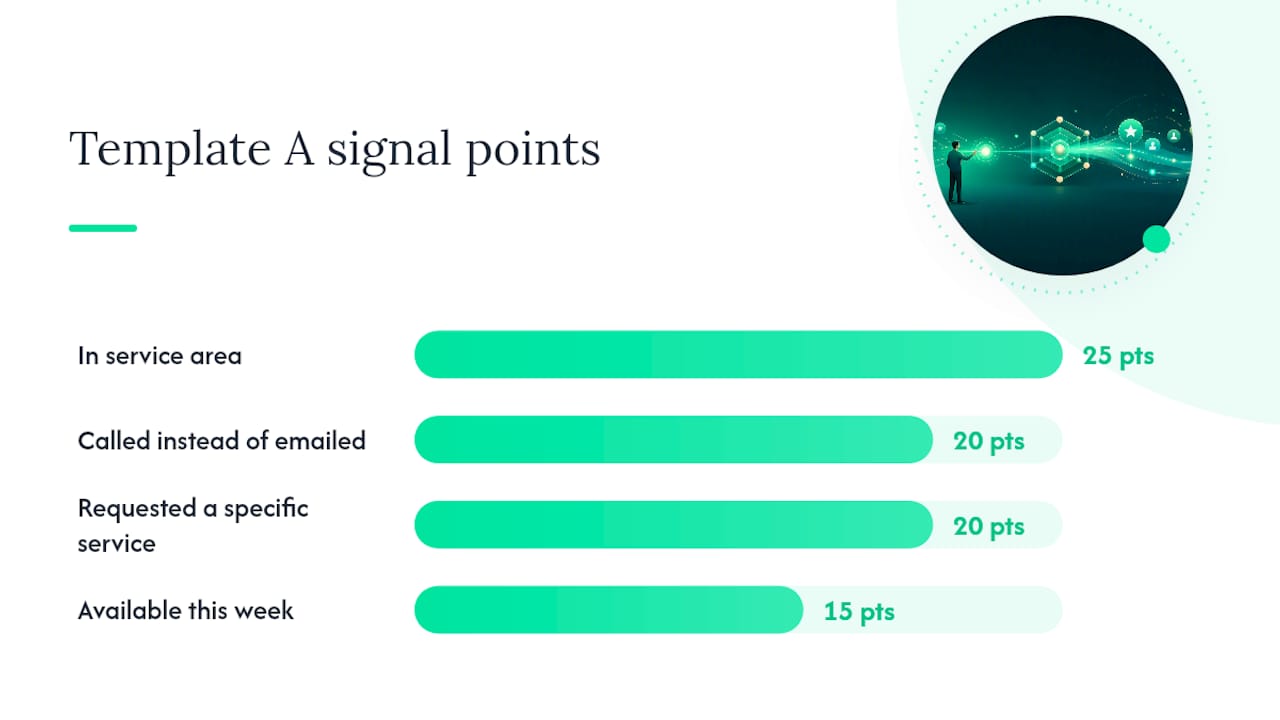
Template A: Local service business. Low lead volume, short sales cycle, and phone calls that close deals. Weight location match and phone-call intent heavily, since a caller from outside your service area is worth almost nothing regardless of how engaged they seem.
| Signal | Points | Why it matters here |
|---|---|---|
| In service area | 25 | Out-of-area leads can't convert |
| Called instead of emailed | 20 | Phone intent signals urgency |
| Requested a specific service | 20 | Higher fit than general inquiry |
| Available this week | 15 | Timeline urgency modifier |
Template B: B2B SMB. Moderate volume, longer cycle, and form type matters more than any single page visit. Weight company size and form type ("request a demo" versus "download a guide") over raw traffic volume.
Template C: Content-driven SaaS. Higher volume means you need engagement caps, or your score inflates for anyone who reads five blog posts without ever looking at pricing. Cap engagement points at a ceiling (say, 20 points max regardless of how many pages someone visits) and build in decay so a lead who went quiet for 45 days loses points automatically.
A useful morning workflow once any of these templates is running: pull the list sorted by score, call every hot lead before checking email, send a batch reply to warm leads, and let cold leads sit in an automated nurture track. Partner case studies on converting traffic into qualified leads show the same pattern holding at higher volume: sort first, then work the list, never the reverse.
Rule-Based Scoring vs. Predictive AI: When to Switch
Stick with rule-based scoring until your data can actually support something smarter. Predictive scoring becomes reliable once you're generating roughly 100 leads a month with several months of clean closed-won history behind you. Below that volume, a machine learning model doesn't have enough signal to separate a real pattern from noise, and you'll end up trusting a score that's really just guessing with extra confidence.
The pitfalls at small-business scale are predictable. Training data gets noisy when your CRM has duplicate contacts or stale email addresses, so cleaning and deduplicating your data before scoring has to happen first, not as an afterthought. And the cost-benefit math rarely works until volume justifies it: paying for a predictive model to score 30 leads a month costs more in setup time than it saves in better prioritization.
Pro Tip: If you're under 100 leads a month, spend your energy tightening your rule-based criteria instead of shopping for an AI tool. A well-calibrated spreadsheet beats a poorly-trained model every time.
This is exactly where Signal Engine removes the friction most SMBs hit when they try to graduate from spreadsheet scoring. Instead of building and training your own model, you get automated scoring calibrated for small-business volume starting at $49 a month, so you skip the "do we have enough data" question entirely.
Automating the Score Once You Have a System
Once your scoring model works on paper, automate the parts that eat time: routing hot leads to the right rep instantly, alerting your team the moment a score crosses the hot threshold, and letting scores decay automatically instead of manually subtracting points every week.
Before you plug in any tool, run through this integration checklist:
- Capture UTM parameters on every form so you know the traffic source behind each lead
- Track form type as a field (quote request versus newsletter signup versus demo request)
- Route phone calls so missed calls get logged and flagged, not lost
- Push score updates into CRM fields automatically instead of updating them by hand
- Set up webhooks so a score change triggers an alert, email, or task
Signal Engine maps directly onto this checklist: automated lead scoring updates in real time, missed-call capture recovers leads who called and hung up before voicemail, and auto-generated campaigns follow up with warm leads without a rep drafting an email. A 7-day trial is enough to see whether the automated version outperforms your manual one.
Measuring Whether Your Scoring Model Works
Track four numbers, and review them every quarter, not once a year.
- MQL to SQL conversion rate by score band. If your "hot" leads aren't converting to sales-qualified leads at a meaningfully higher rate than "warm" ones, your point weighting is off.
- Speed to contact. Measure how fast hot leads actually get called, not just what your SLA says. A 15-minute target that turns into a 4-hour reality means routing is broken, not the score.
- Win rate and average deal value by band. Hot leads should close more often and, ideally, close bigger. If cold leads are quietly outperforming warm ones, recheck your criteria.
- Look-back sample results. Pull 90 days of closed and lost deals every quarter, sort by the score each lead had, and see if the bands still predict outcomes. Adjust point values based on what actually happened, not what you assumed would happen.
Assign one person to own this review each quarter. Bring the four numbers above, the last 90 days of closed-won and closed-lost deals, and adjust one or two point values at a time. Changing five criteria at once makes it impossible to tell which change helped.
Why I Tell Small Teams to Skip the Fancy Model
Every small business I've watched try lead scoring makes the same mistake first: they build a 20-criteria model before they've proven a 5-criteria one works. Overengineering feels productive. It isn't. A five-point model you actually maintain beats a twenty-point model that gets abandoned after three weeks because nobody has time to update it.
The businesses that stick with scoring long enough to see results are the ones that started small, watched what actually predicted a closed deal, and added complexity only when the data demanded it. That's not caution. It's the only version of lead scoring that survives contact with a busy sales week.
— Bernard
Ready to Stop the Revenue Leak?
Every step in this guide, picking signals, assigning points, setting thresholds, running the look-back, is exactly what Signal Engine automates the moment you connect your CRM. Signal Engine gives small and local businesses 31 AI-powered tools to score leads by buying intent, predict churn before it happens, auto-generate email and SMS campaigns, and recover missed calls automatically, all in one dashboard starting at $49/month.
Start your free 7-day trial — no credit card required. Setup takes 5 minutes.
Key Takeaways
Lead scoring works when it combines fit, intent, and engagement into a simple point system your team actually maintains and revisits every quarter.
| Point | Details |
|---|---|
| Start with 3 to 8 criteria | Pick fit, intent, and engagement signals you can already capture in a form or CRM field. |
| Use hot/warm/cold thresholds | Common bands run 70+ hot, 40 to 69 warm, below 40 cold, each with its own response speed. |
| Add urgency and decay | Boost scores for stated timelines and subtract points after 30 days of silence. |
| Wait on predictive AI | Stay rule-based until you hit roughly 100 leads a month with clean closed-won history. |
| Automate once the model works | Signal Engine turns a validated scoring model into automatic routing, alerts, and missed-call recovery starting at $49/month. |
Where This Guide's Numbers Come From
- True Conversion lays out the three-dimension fit, intent, and engagement model built for spreadsheets, not enterprise software.
- Capsule CRM covers the data thresholds where predictive scoring starts to outperform rules, plus data hygiene steps.
- CRM Beat details simple scoring matrices small teams can run inside a CRM or Google Sheet.
- Business walks through the stepwise construction of an explainable scoring model.
- Marketing Calc Hub provides sample scoring thresholds and routing SLAs used across SMB guides.
Sources
- Lead Scoring for Small Businesses: You Don’t Need Salesforce - True Conversion
- AI lead scoring for small business: How to build a working model
- Lead Scoring for Small Businesses | CRM Beat
- How to Build a Lead Scoring System That Actually Works
- Lead Scoring Calculator — Fit, Intent, Engagement
FAQ
Can you give me an example of lead scoring?
A local service business might give 25 points for being in the service area, 20 for calling instead of emailing, and 20 for requesting a specific service, then call anyone scoring above 60 within 15 minutes.
How many leads does it take to close a sale?
There's no fixed number since it depends on your industry and sales cycle, but tracking your own MQL to SQL conversion rate by score band over 90 days gives you a real answer specific to your business.
How is a lead score calculated?
You add points for fit signals (company size, location), intent signals (pricing page visits, form type), and engagement signals (replies, repeat visits), then subtract points for negative signals like unsubscribes or 30 days of silence.
What is the best tool for lead generation for small businesses?
The right tool depends on your volume and budget, but a spreadsheet or CRM field works for most small teams under 100 leads a month, while a platform like Signal Engine automates scoring, routing, and missed-call recovery once you're ready to scale past manual tracking.