

TL;DR:
- Real-time alerts notify sales representatives instantly when prospects show buying signals, enabling quicker responses. Companies that implement AI-driven alerts see significant increases in qualified opportunities and deal closure speed. Properly designed alerts with clear ownership, context, and response protocols maximize sales effectiveness.
Real-time alerts in sales are defined as immediate, AI-driven notifications that fire the moment a prospect shows buying intent, so your rep can respond before the window closes. The role of real-time alerts in sales goes far beyond simple pings. Responding within 5 minutes increases lead qualification likelihood by 21 times, and companies using automated alert systems see 30–50% more qualified opportunities by catching prospects during active research. That single timing advantage separates teams that win deals from teams that leave voicemails. Sales leaders who treat alerts as a core revenue mechanism, not a notification feature, consistently outpace those who don't.
How do real-time alerts transform sales responsiveness?
Speed is the defining variable in lead qualification. A prospect who fills out a form, visits a pricing page, or opens a proposal email is in a buying window that lasts minutes, not days. Traditional notification systems miss 60% of high-intent buying windows, while AI-tuned alert models achieve 85% precision in detecting high-value signals. That gap is where revenue is lost or won.

Manual lead monitoring costs reps roughly 15 hours weekly. AI-driven real-time sales notifications eliminate that grind and improve overall team productivity by 40%. Those recovered hours go directly into conversations, follow-ups, and closing.
The difference between traditional notifications and AI-powered alerts comes down to context and prioritization. A basic CRM notification tells you someone submitted a form. An AI-powered alert tells you the prospect visited your pricing page three times, opened your last email, and is in a company that just raised funding. That context changes how your rep opens the conversation.
- Speed: Alerts fire within seconds of a trigger event, not on a scheduled batch.
- Prioritization: AI scores signals by intent strength, so reps see hot leads first.
- Context: Each alert carries account history, recent activity, and suggested next action.
- Routing: Alerts go to the right rep based on territory, capacity, or account ownership.
Pro Tip: Set your alert system to notify reps via their primary channel, whether that's Slack, Microsoft Teams, or SMS, so the notification reaches them where they already work.
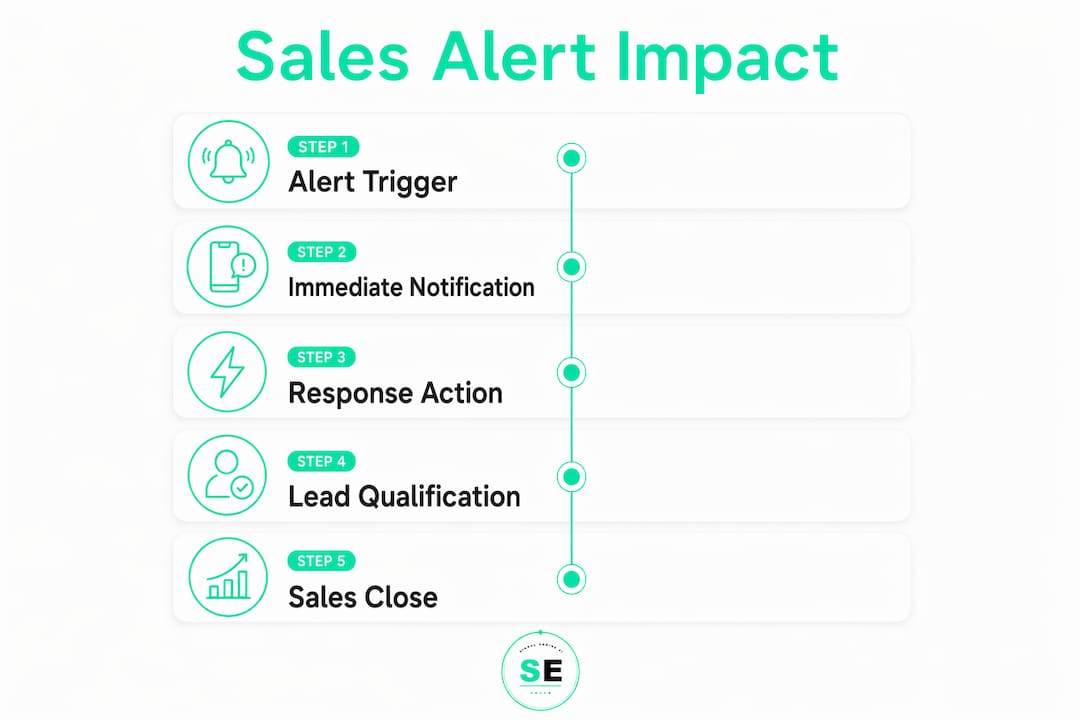
What makes a sales alert actually work?
Most sales alert systems fail not because of bad data, but because of bad design. An alert that lands without a clear owner, a suggested action, or a response path gets ignored. Well-structured alerts function as a user interface that drives action, not a passive data feed that reps scroll past.
The "one alert, one owner, one action" principle is the foundation of every high-performing alert system. When an alert has a single assigned rep, a single recommended response, and a single disposition button, accountability is clear. Shared alerts with no named owner create diffused responsibility. Nobody acts because everybody assumes someone else will.
Context is the second critical element. Embedding one-click response templates in alerts cuts the average 23-minute context-switching penalty that hits reps every time they have to hunt for information before responding. The alert should contain the prospect's name, company, recent behavior, and a pre-written opening message. The rep clicks, reviews, and sends in under 60 seconds.
The third element is a clear service-level agreement (SLA). Every alert needs a defined response window, such as 5 minutes for hot leads and 30 minutes for warm signals. Without an SLA, urgency is subjective and response rates drop.
"Alert design competes directly with Slack, email, and every other notification fighting for rep attention. Clarity and actionability beat completeness every time. If your alert requires three clicks to understand, it has already lost."
Pro Tip: Build a disposition mechanism into every alert. A simple "Contacted / Not Reached / Not Relevant" button gives your team a feedback loop and keeps your alert system from becoming a black hole.
The numbered steps below reflect the sequence for building an alert your reps will actually use:
- Assign one owner. Name the rep in the alert, not just the territory.
- Embed full context. Include account history, trigger event, and company details.
- Add a one-click response template. Pre-write the opening message.
- Set an SLA timer. Display the response deadline inside the alert.
- Include a disposition button. Let reps log the outcome without leaving the notification.
How do alerts support competitive intelligence and pipeline management?
Real-time alerts extend well beyond inbound lead notification. Sales teams use them to monitor the external events that shift deal dynamics, such as a competitor raising funding, a key contact changing jobs, or a target account posting a new job opening that signals budget activity. Competitive intelligence alerts give teams a window of minutes to hours to adjust messaging and act before the market shifts.
For pipeline management, account monitoring alerts flag renewal risk, upsell signals, and engagement drops before they become lost deals. A customer who stops opening emails, reduces platform usage, or posts a job for a role your product replaces is sending a signal. An alert catches it early. You can automate at-risk account alerts to trigger the moment behavior crosses a defined threshold.
AI-powered alerts integrate with tools like Slack and Microsoft Teams, pushing priority notifications directly to the channels reps use most. This reduces delay and increases the chance of immediate action. CRM platforms like Microsoft Dynamics 365 support alert routing natively, and most modern revenue intelligence platforms offer webhook-based delivery to any communication tool.
- Competitor monitoring: Alerts on funding rounds, leadership changes, and product launches.
- Renewal signals: Alerts when contract end dates approach or usage drops.
- Upsell triggers: Alerts when account activity suggests expanded need.
- Pipeline velocity: Alerts when deals go silent beyond a defined number of days.
- Management alignment: Alerts routed to leaders when high-value deals stall.
Pro Tip: Use competitor tracking automation to monitor your top five competitors for news events. When a competitor stumbles, your team should know within the hour.
Sales teams that align alert cadence with their sales motion close the reaction gap and increase deal velocity in measurable ways. The teams that win are the ones who act on intelligence before their competitors even know it exists.
How do you measure the impact of sales alert systems?
Measuring the impact of alerts on sales requires tracking the right metrics at each stage of the alert-to-close sequence. Most teams track pipeline and close rates but skip the leading indicators that show whether their alert system is actually working.
The core metrics for any sales alert system are:
- Alert-to-contact time: How long from alert fire to first rep outreach. Target under 5 minutes for hot leads.
- Contact-to-qualification rate: What percentage of alerted leads convert to qualified opportunities.
- Alert disposition rate: What percentage of alerts get logged as contacted, not reached, or irrelevant. Low rates signal alert fatigue.
- Conversion uplift: Compare close rates for alerted leads versus non-alerted leads in the same cohort.
- False positive rate: How often alerts fire on low-intent signals. High rates erode rep trust.
A/B testing alert thresholds is the fastest way to improve precision. Run one group of reps on a high-sensitivity setting that fires on every signal, and another on a filtered setting that fires only on multi-signal triggers. Compare disposition rates and qualification rates after 30 days. The filtered group almost always shows higher engagement per alert.
| Metric | What it tells you |
|---|---|
| Alert-to-contact time | Whether reps treat alerts as urgent |
| Contact-to-qualification rate | Whether alerts target the right signals |
| Alert disposition rate | Whether reps are engaging or ignoring |
| Conversion uplift | Whether alerts drive measurable revenue |
| False positive rate | Whether AI thresholds need tightening |
Dynamic routing based on rep capacity is the next level of optimization. When a rep is in a meeting or at capacity, alerts should reroute to a backup owner automatically. Static routing wastes hot leads on unavailable reps. Signalengine handles this with AI-driven lead scoring and routing built into its revenue intelligence platform, so no alert sits unread because the assigned rep is offline.
Key Takeaways
Real-time sales alerts drive measurable revenue gains only when they are fast, contextual, owned, and tied to a clear response action.
| Point | Details |
|---|---|
| Speed is the primary lever | Responding within 5 minutes increases qualification likelihood by 21 times. |
| Alert design determines rep behavior | One owner, one action, and embedded templates drive response rates up. |
| AI prioritization cuts noise | 85% precision models filter low-intent signals and protect rep attention. |
| Competitive alerts open new windows | Monitoring funding and leadership changes gives teams hours to act first. |
| Measure alert-to-contact time first | This single metric reveals whether your alert system is working or ignored. |
Why most sales teams are still using alerts wrong
I've watched sales teams spend serious money on alert infrastructure and still lose deals they should have won. The problem is almost never the data. It's the design.
The teams I've seen succeed treat every alert like a product. They ask: would a rep actually act on this? Does it tell them what to do next? Can they respond in under a minute? If the answer to any of those is no, the alert goes back to the drawing board.
The shift from reactive to proactive sales culture doesn't happen because you bought a new tool. It happens when alerts become the rhythm of the day. Reps stop checking their CRM every hour and start trusting that the system will surface what matters. That trust takes weeks to build and one bad batch of false positives to destroy.
The emerging trend worth watching is multi-signal AI prioritization. Instead of firing on a single event, next-generation alert systems score combinations of signals, such as a pricing page visit plus an email open plus a LinkedIn profile view, and fire only when the combined score crosses a threshold. That approach cuts noise dramatically and makes every alert feel urgent because it is.
Sales efficiency through alerts is not a feature you turn on. It's a discipline you build. The teams that get it right treat alert optimization as an ongoing process, not a one-time setup.
— Bernard
Signalengine puts real-time intelligence to work for your team
Sales teams running on manual monitoring and delayed notifications are leaving qualified leads on the table every day. Signalengine was built to fix that for small and mid-sized businesses that can't afford a dedicated ops team.
Signalengine's AI-powered revenue intelligence tools score leads by buying intent, fire alerts the moment behavior crosses your defined thresholds, and route notifications to the right rep automatically. It monitors competitor moves, flags churn risk, and surfaces upsell signals across 12 verticals including HVAC, logistics, dental, and real estate. Setup takes minutes. No data team required. Pricing starts at $49/month, built for teams that need results without the enterprise price tag.
FAQ
What is the role of real-time alerts in sales?
Real-time alerts notify sales reps the moment a prospect shows buying intent, enabling response within the critical 5-minute window that increases qualification likelihood by 21 times.
How do real-time sales notifications improve conversion rates?
Companies using automated real-time alerts see 30–50% more qualified opportunities by engaging prospects during active research rather than hours later.
What should a well-structured sales alert include?
Every alert should have a named owner, embedded context, a one-click response template, an SLA timer, and a disposition mechanism to log the outcome.
How do alerts help with competitive intelligence?
Real-time competitive alerts monitor events like funding rounds and leadership changes, giving sales teams a window of minutes to hours to adjust messaging before competitors respond.
How do you prevent alert fatigue in a sales team?
Use AI-driven prioritization to filter low-intent signals, set clear SLAs, and run A/B tests on alert thresholds to keep false positive rates low and rep trust high.
Ready to Stop the Revenue Leak?
Signal Engine gives small and local businesses 31 AI-powered tools to score leads by buying intent, predict churn before it happens, auto-generate email and SMS campaigns, and recover missed calls automatically — all in one dashboard starting at $49/month.
Start your free 7-day trial — no credit card required. Setup takes 5 minutes.