

Tracking competitor ads, in a revenue-intelligence sense, means monitoring account-level signals like pricing moves, hiring spikes, and prospect engagement with rival marketing, then routing those signals straight into your CRM. The outcome is simple: reps get prioritized outreach lists and churn warnings before deals go cold, instead of finding out a competitor stole an account three weeks after the fact.
TL;DR:
- Monitoring account-level signals like pricing changes and prospect engagement allows for quick, targeted outreach within hours of a move, especially prospect interactions.
- Focus your efforts on 3 to 7 direct competitors identified from your CRM data, rather than a broad, unfocused competitor set, for quicker, more actionable insights.
- Prioritize signals such as prospect engagement and pricing shifts, checking hourly for the former and every 4 to 6 hours for the latter, to maximize deal opportunity windows.
- Assign owners and automate responses for each high-severity signal, enabling immediate actions like updating battlecards or triggering outreach sequences within 24 hours.
- Effective program implementation requires ongoing weekly review by a dedicated owner, focusing on three competitors and two playbooks for 2-3 weeks before scaling or expecting measurable results.
Table of Contents
- What "Track Competitor Ads" Actually Covers
- Which Signals Actually Move Revenue, and How Often to Check Them
- How to Set Up Competitor Ad Tracking Step by Step
- What to Do the Moment a Signal Fires
- How to Know the Program Is Actually Working
- How Signal Engine Turns These Signals Into Action
- Adoption Beats Data
- Ready to Stop the Revenue Leak.
- Sources
- FAQ
What "Track Competitor Ads" Actually Covers
The phrase gets thrown around loosely, so let's define it the way it matters for pipeline: this is competitor monitoring at the account level, not an archive of ad creatives. You're not screenshotting a rival's Instagram carousel. You're watching public strategic signals, pricing pages, product changelogs, hiring posts, funding news, and whether your prospects are visiting a competitor's site, and feeding that into a system that scores urgency and assigns action.
Account-level monitoring beats market-level trend-watching because pipeline lives at the account level. Knowing "Competitor X raised prices industry-wide" is trivia. Knowing "Account Y, currently in your pipeline, just visited Competitor X's pricing page twice this week" is a deal signal. The seven-step weekly system IndustryLens recommends works because it tracks the delta, what changed, rather than rereading full pages every time.
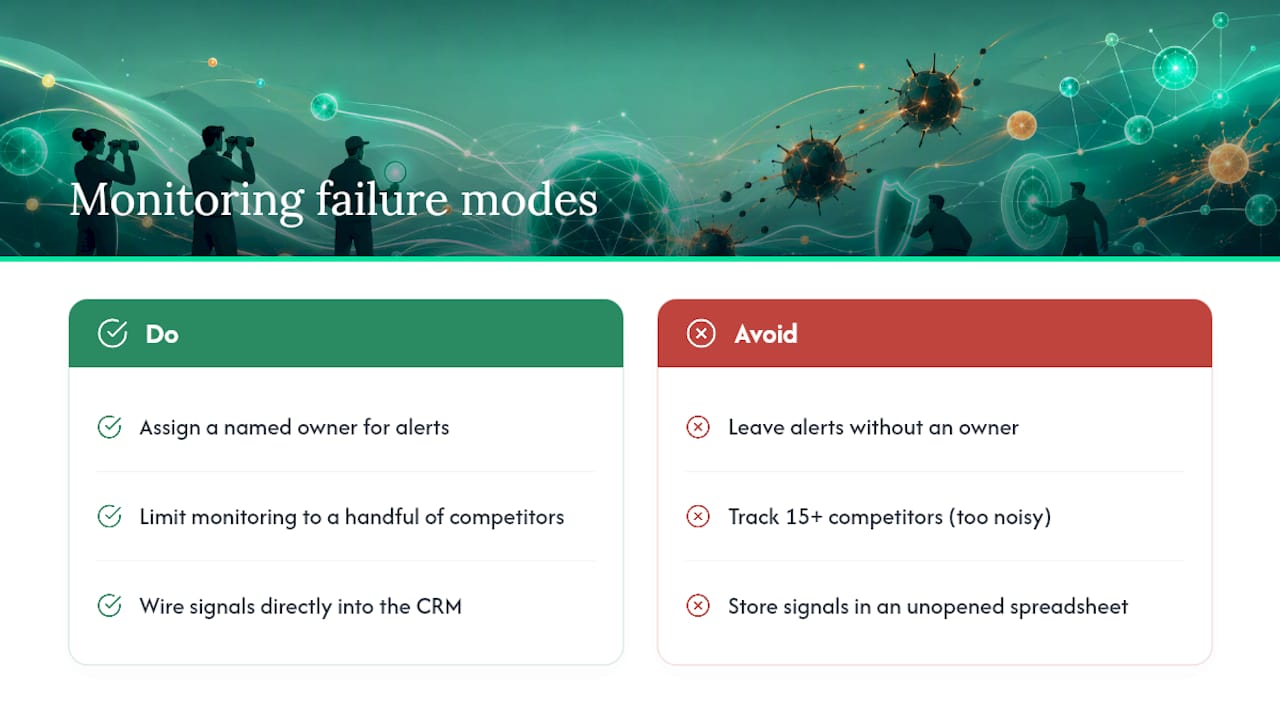
Three failure modes kill most SMB monitoring efforts before they produce value. No named owner means alerts pile up unread. Watching fifteen competitors instead of a handful buries the team in irrelevant noise. And building a monitoring feed with no CRM wiring means signals live in a spreadsheet nobody opens. Fix those three and the rest gets much easier.
Which Signals Actually Move Revenue, and How Often to Check Them
Not every competitor move deserves a Slack alert. Some signals predict a deal is at risk; others just confirm what already happened. Here's the priority order, from most urgent to most background.
- Prospect engagement with competitor content (pricing pages, review sites, comparison pages): the single highest-value signal for timing outreach, according to Interceptly's research on account-level engagement. This is a leading indicator. Check continuously; act within hours.
- Pricing and packaging changes: a direct threat to active deals. Poll every 4 to 6 hours on rival pricing pages.
- Homepage and positioning copy shifts: signals a new pitch or repositioning. Poll every 4 to 6 hours.
- Hiring and job postings: a spike in sales or customer success roles often precedes an aggressive push into your territory. Check daily.
- News, press releases, and funding announcements: confirmation-level signals that shape battlecards. Check every 15 to 60 minutes during business hours since these move fast on social media.
- Product and changelog pages: tells you what capability gaps just closed or opened. Daily is usually enough.
Automated monitoring catches a meaningful share of moves that manual, occasional checks simply miss, according to Clarivian's guidance on SME competitive monitoring, which recommends five continuous watch categories: pricing, hiring, website content, news, and public filings.
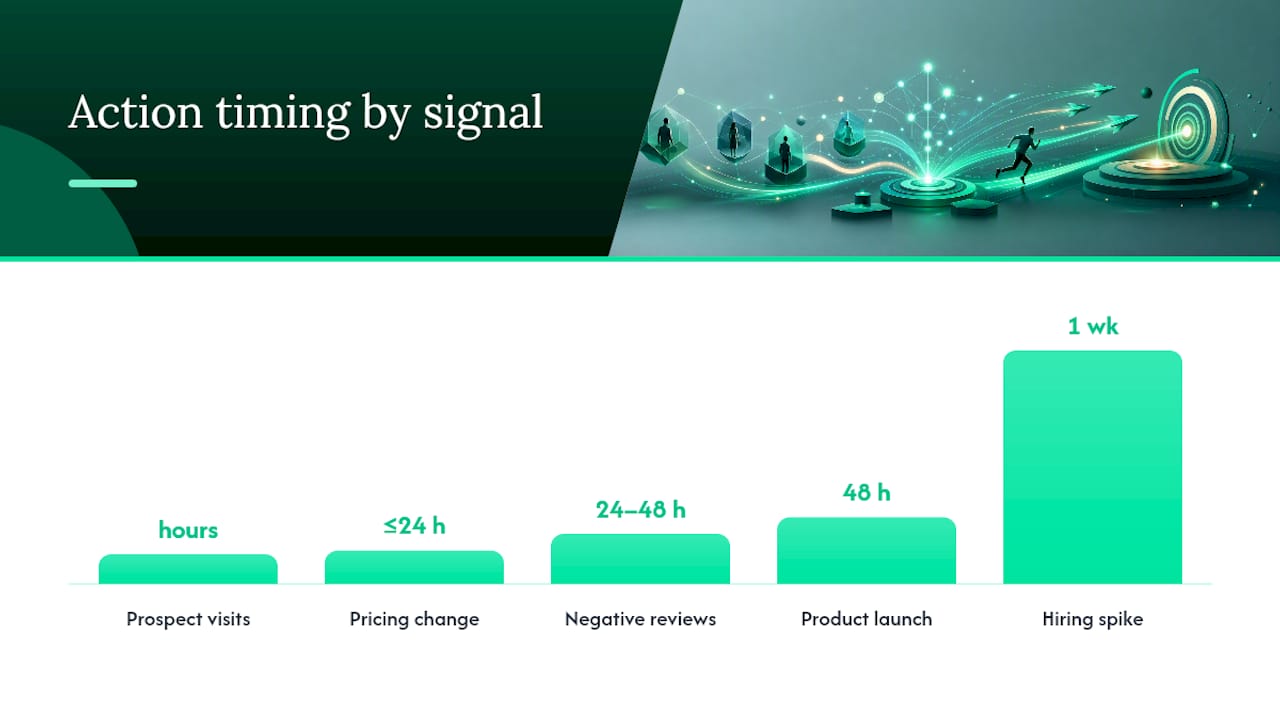
Pro Tip: Rank your signals by how many hours of warning they give you before a deal is at risk. Prospect engagement gives you hours. Hiring spikes give you weeks. Spend your team's attention accordingly.
How to Set Up Competitor Ad Tracking Step by Step
Standing up a monitoring system that actually gets used, rather than ignored after week two, comes down to five deliberate choices.
- Pick 3 to 7 direct competitors. Pull this list from your own lost-reason data in the CRM, not from a Google search. If a competitor never shows up in deal notes, it doesn't belong in your feed yet.
- Add a small bench of adjacent players. One or two companies who aren't direct rivals yet but keep appearing in prospect research.
- Choose your sources and assign a polling window to each. Pricing pages every few hours, job boards daily, news feeds near real time.
- Wire every signal type to a CRM field. In HubSpot or Salesforce, that means a custom property, a workflow trigger, and an owner assignment, so a signal creates a task instead of sitting in a dashboard.
- Tune the model for the first two to three weeks. Mark alerts as relevant or noise. Clarivian's research shows this calibration window is what separates a feed that surfaces real signal from one everyone mutes.
A practical trick for keeping this affordable: run cheap hash checks against competitor pages first, and only trigger a full AI analysis when something actually changes. That two-layer approach is what makes frequent, near real-time polling viable for a small team's budget instead of a data bill that scales with every page you watch.
What to Do the Moment a Signal Fires
An alert with no assigned next move is just noise with better formatting. Every signal type needs an owner, a script, and a clock.
- Competitor drops or restructures pricing: owner is the deal's rep; pull the updated battlecard section on pricing objections; first touch within 24 hours.
- Hiring spike in sales or CS roles: owner is sales leadership; review territory overlap; no urgent outreach needed, but update the account plan within a week.
- Product launch or major feature release: owner is a sales engineer or product marketer; update the comparison battlecard; brief the team within 48 hours.
- Prospect visits a competitor's pricing page: owner is the account rep; trigger a pre-built multi-channel sequence, email plus a call attempt, within hours, not days.
- Negative review surge against a competitor: owner is marketing or the rep working that account; this is an opening, not a threat; reach out referencing the specific pain point within 24 to 48 hours.
The fastest path from signal to booked meeting is a triggered sequence sent within hours of the trigger event, not a manual task waiting in someone's queue, based on Interceptly's findings on intercepting buying windows. Build escalation rules so high-severity signals, like a prospect visiting a competitor's pricing page three times in a week, jump straight to a manager's view instead of waiting for the weekly pipeline review.
Pro Tip: Pre-write your first-touch message for each playbook before you ever need it. When a signal fires and the clock is running, you don't want a rep improvising an email at 4:45 on a Friday.
How to Know the Program Is Actually Working
A monitoring system that nobody checks is worse than no system, because it gives you false confidence that you're covered. Track these five numbers weekly:
- Time from signal fired to first outreach attempt
- Win rate on accounts where a signal triggered action, versus accounts with no signal
- Churn rate among accounts showing competitor engagement before they left
- How often reps actually open and use the battlecards tied to each playbook
- Pipeline coverage by segment, so you know where signals are thin
Someone has to own enforcement. That's usually RevOps or a sales leader running a weekly fifteen-minute review of open signals and stale alerts. Without a named owner checking this cadence, adoption becomes the real failure point, not the quality of the signals themselves. A small starting scope, three competitors and two playbooks, produces measurable adoption faster than trying to monitor everyone on day one, echoing the focused competitor-set approach IndustryLens recommends. Expect two to three weeks of tuning before the feed stabilizes, and eight to twelve weeks before you can point to a measurable shift in win rate or time-to-outreach.
How Signal Engine Turns These Signals Into Action
This entire playbook, the signal categories, the cadence, the CRM routing, the action protocols, is what some revenue intelligence platforms are designed to run automatically instead of manually.
- Competitor price and packaging tracking feeds directly into account-level scoring, so accounts showing risk or opportunity rise to the top of a rep's list.
- Churn flags combine competitor engagement signals with your own usage data, catching accounts at risk before they cancel.
- CRM integrations push signals as tasks and fields, so nothing sits in a separate dashboard nobody opens.
- Automated campaign triggers fire the email and SMS sequence the moment a high-value signal lands, no manual copy-paste required.
Businesses across HVAC, dental, and real estate use these same signal categories to catch a competitor's seasonal pricing push or a hiring spike before it costs them renewals. If you want to see how the scoring and routing actually behaves on your own accounts, the Signal Engine Free plan is the fastest way to find out.
Adoption Beats Data
Most competitor-monitoring programs don't fail because the signals are wrong. They fail because nobody owns the review, and the feed drowns in every possible competitor instead of the three that actually cost you deals. Name one owner, start with three competitors, and insist on a weekly fifteen-minute review, no exceptions. Build two playbooks first, automate the first-touch sequence for each, and measure time-to-action before you add a third. Everything else can wait.
— Bernard
Ready to Stop the Revenue Leak.
Signal Engine gives small and local businesses 31 AI-powered tools to score leads by buying intent, predict churn before it happens, auto-generate email and SMS campaigns, and and recover missed calls automatically — all in one dashboard starting at $49/month.
Start your free 7-day trial — no credit card required. Setup takes 5 minutes.
Sources
- Competitor Monitoring for SMEs: Tools, Costs, Setup
- How to Track Competitors: A 7-Step Weekly System
- Monitor Competitor Activity to Win B2B Deals | Interceptly
FAQ
What does "tracking competitor ads" mean in revenue intelligence?
It means monitoring account-level competitor signals, pricing, hiring, positioning, and prospect engagement, and routing them into your CRM so reps get alerted within hours instead of finding out about a lost deal after the fact.
How many competitors should a small business monitor?
Start with 3 to 7 direct competitors chosen from your own lost-reason data, plus one or two adjacent players worth watching. A focused list produces usable weekly signal faster than tracking a dozen rivals at once.
What's the single highest-value signal to watch?
Prospect engagement with a competitor's pricing page or comparison content. It's the clearest lead indicator that a buying window is open, which is why it deserves an hours-not-days response time.
How long before a competitor monitoring program shows results?
Expect two to three weeks of tuning the feed by marking alerts relevant or not, then eight to twelve weeks before you see a measurable shift in win rate or time-to-outreach.
Does Signal Engine handle competitor monitoring automatically?
Yes. Signal Engine tracks competitor pricing and packaging moves, scores accounts at risk, and triggers email and SMS sequences automatically, all inside the same dashboard used for lead scoring and churn prediction.