

A customer segmentation model is a repeatable method for grouping customers by shared traits so you can target, message, and price differently for each group. The main models are RFM, behavioral, demographic, value-based, clustering/ML, and lifecycle or account tiers. If you sell high-frequency B2C products, start with RFM. If you run B2B, start with lifecycle stage plus account tiers, then layer in clustering once your data matures.
TL;DR:
- RFM segmentation is suitable for small teams and provides actionable insights, especially with transaction data, without requiring advanced data science skills.
- Building a reliable segmentation model requires clean data, deduplication, feature engineering, and clear labeling of clusters before campaign implementation.
- Regular validation through statistical measures and business outcomes, such as conversion and churn rates, ensures the segmentation remains effective over time.
- Demographic and geographic segments are quick to implement but should be layered with behavioral or value data to reduce bias and improve relevance.
- Automated platforms like Signal Engine simplify ongoing segmentation and campaign automation, making advanced AI-driven models accessible to small and medium-sized businesses.
Table of Contents
- What Is a Customer Segmentation Model, and Why Does It Matter?
- The Core Segmentation Models (and a Campaign Idea for Each)
- How to Build a Segmentation Model Step by Step
- How Do You Know a Segment Is Actually Working?
- Which Model Should You Start With?
- What Segmentation Looks Like in Practice for a Small Team
- Where Segmentation Goes Wrong
- Turn These Models Into Signal Engine Playbooks
- Sources
- FAQ
- Ready to Stop the Revenue Leak?
What Is a Customer Segmentation Model, and Why Does It Matter?
A segmentation "type" describes the trait you're grouping by (age, purchase frequency, industry). A segmentation "model" describes the method you use to build and score those groups. Demographic is a type; RFM and K-Means are models. Mixing these up is the single most common reason marketing teams end up with segments nobody can act on.
Customer segmentation groups customers into meaningful clusters using shared characteristics, drawn mostly from first-party data, so a business can tailor marketing, pricing, and service instead of treating every buyer the same way. That distinction matters because customer segmentation runs on your own transaction and behavior data, while market segmentation leans on external research to size an entire category of buyers you don't yet have.
Segmentation earns its place on your roadmap because it changes what you do next, not just what you know. Done well, it drives:
- Sharper targeting, so ad spend and sales hours go to the accounts most likely to convert
- Personalization that actually lifts open rates and reply rates instead of just feeling personal
- Earlier churn detection, because at-risk behavior shows up inside a segment before it shows up on a revenue report
- Pricing and packaging decisions grounded in what each group actually pays for, not what you assume they'll pay for
Skip the modeling step and you get a spreadsheet of labels. Build the model correctly and you get a machine for deciding who gets which message, this week.
The Core Segmentation Models (and a Campaign Idea for Each)
Seven models cover almost every real-world segmentation need. Common types include demographic, geographic, psychographic, behavioral, technographic, firmographic, and value-based segmentation, built using methods ranging from simple rules to full machine learning clustering. Here's how each one works and what to do with it immediately.
-
Demographic segmentation. Groups by age, income, gender, education, or family status. Needs only basic CRM or signup fields. Best for broad product positioning and media buying, but weak on its own for predicting behavior. Quick play: split your email list by age band and test two subject line tones against each.
-
Geographic segmentation. Groups by country, region, climate, or urban versus rural location. Needs address or IP data. Best for local promotions, inventory planning, and service-area targeting. Quick play: trigger a "now serving your area" campaign the day a new zip code goes live.
-
Psychographic segmentation. Groups by values, lifestyle, or attitudes, usually gathered through surveys or Jobs-to-Be-Done interviews that surface the "why" behind a purchase. Best for brand positioning and creative direction. Quick play: run five customer interviews asking what they were really trying to accomplish, then rewrite your top landing page headline around the answer.
-
Behavioral segmentation. Groups by purchase history, product usage, engagement, or support tickets. Best for lifecycle marketing and churn prevention, since behavior predicts intent far better than who someone is on paper. Quick play: flag anyone who hasn't logged in for 30 days and drop them into a re-engagement sequence.
-
RFM segmentation. Scores customers on Recency, Frequency, and Monetary value, then combines the three scores into labels like "champions" or "at risk." RFM is fast to implement and produces immediately actionable segments because each dimension maps directly to a retention or win-back tactic. Best for any business with repeat transactions. Quick play: pull your last 12 months of orders into a spreadsheet, score each customer 1 to 5 on each dimension, and build a win-back offer for anyone scoring low on recency but high on monetary.
-
Technographic and firmographic segmentation. Group B2B accounts by tech stack, company size, industry, or revenue band. Best for sales prioritization and account-based marketing. Quick play: flag every account still running a legacy tool your product replaces and route them to a switch-focused sales sequence.
-
Clustering and machine learning models. K-Means and DBSCAN discover natural groupings in your data without you defining rules up front; decision trees and gradient-boosted models add explainability by showing which features actually drove the split. Best once you have enough clean behavioral and transaction data to make discovery worthwhile, typically a few thousand active customers. The tradeoff: more setup time, and clusters need a human to translate them into names your sales team will actually use. Quick play: cluster on purchase frequency and average order value, then hand the top cluster to sales as a targeted upsell list.
-
Value-based (LTV) segmentation. Ranks customers by predicted lifetime value rather than any single behavior. Best when you need to prioritize a limited support or sales team on the accounts worth protecting first. Quick play: identify your top 10% by LTV and put them on a dedicated account manager or a VIP support queue.
-
Lifecycle and account-tier models. Map customers to stages (trial, onboarding, active, at-risk, churned) or B2B accounts to tiers (enterprise, mid-market, SMB) based on spend and support effort required. Best for B2B teams that need one model both sales and customer success can share. Quick play: set an automatic tier upgrade trigger the moment an account crosses a spend threshold, and route it to a named account manager.
How to Build a Segmentation Model Step by Step
Building a segmentation model that survives contact with a real campaign calendar takes five stages. Skip the preprocessing stage and every model downstream inherits the mess.
-
Gather your data sources. RFM needs only transaction history: order date, order value, customer ID. Clustering and ML models need more: transaction history plus behavioral events (logins, clicks, support tickets) and ideally firmographic or demographic enrichment. If you don't have clean event data yet, start with RFM and build toward clustering.
-
Run identity resolution and deduplication. Match customer records across email, phone, and account ID so "Jane Smith" in your CRM and "j.smith@" in your billing system become one customer, not two. This step is where most segmentation projects quietly fail, because a duplicated customer skews every score downstream.
-
Engineer features and handle outliers. Turn raw events into usable numbers, such as days since last purchase, average order value, or ticket count in the last 90 days. Scale your features so a $50,000 enterprise order doesn't drown out every other signal in a clustering model, and cap or remove extreme outliers before you fit anything.
-
Pick your method based on team skill and goal. Rules and RFM for a fast win with no data science support. K-Means or DBSCAN when you want the data to reveal groupings you haven't defined yet. Decision trees or gradient-boosted models when leadership will ask "why is this customer in this segment" and you need a clean answer. Continuous ML segmentation once you have reliable, always-on event streams and a team that can maintain a model.
-
Label clusters and map them to campaigns. A cluster numbered "3" means nothing to a sales rep. Translate it into a name tied to behavior, like "high-value renewers" or "single-purchase discount shoppers," and assign each label a specific channel, message, and owner before you consider the project finished.
Pro Tip: Build your labeling step around real customer data, not a wish list of who you'd like your customers to be. Customer profiles built from transaction and behavioral data hold up in production far better than personas built from assumptions.
Most teams don't need a data science platform on day one. The realistic path runs spreadsheet or SQL for RFM, then Python or R once you're ready to cluster, then a CDP or dedicated ML system once segmentation needs to update itself continuously rather than run as a quarterly project.
How Do You Know a Segment Is Actually Working?
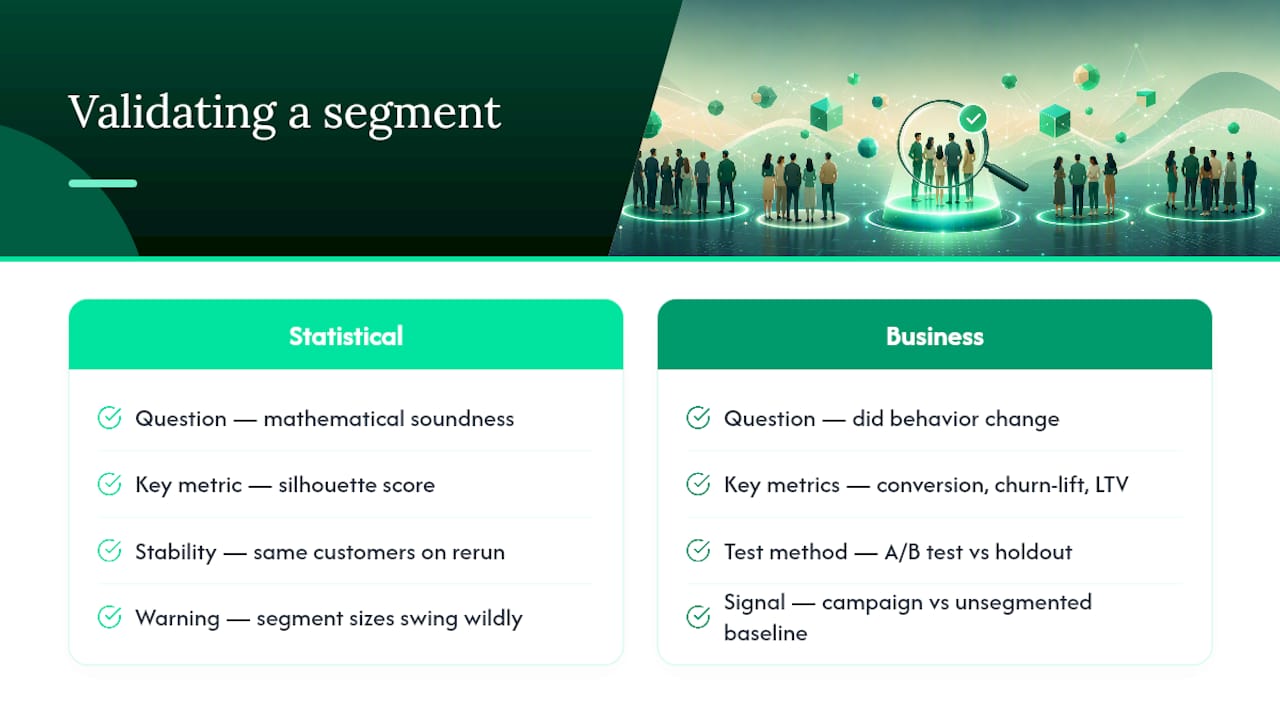
Two kinds of proof matter, and most teams only check one. Statistical validation asks whether your clusters are mathematically sound: a silhouette score close to 1 means tight, well-separated groups, while a score near 0 means your clusters overlap so much they're not really distinct. Cluster stability checks whether the same customers land in the same group when you rerun the model next month. If your segment sizes swing wildly on a small parameter change, the model isn't ready for a campaign budget.
Business validation asks the question that actually pays the bills: did the segment change behavior? Run A/B tests where one group gets a segment-specific message and a holdout gets your standard message, then track conversion lift, churn-lift (how much slower the at-risk segment churns after intervention), and downstream LTV movement.
Analytics-driven marketing programs report meaningfully better ROI than campaigns run on gut instinct, which is exactly the gap A/B testing your segments is designed to close.
A few working signals to track on a recurring basis include monitoring segment size to avoid it trending toward zero or encompassing most of your customer base, tracking conversion rates on segment-targeted campaigns relative to your unsegmented baseline, measuring churn-lift on at-risk segments after retention offers, and noting the time since the last model refresh, with typical frequencies adjusted per model type.
Refresh RFM segments monthly if you have transaction volume to support it. Refresh ML-driven clusters continuously if your identity and event data are clean enough to trust; if they're not, fix identity resolution before you trust any refresh cadence.
Which Model Should You Start With?
The right model depends on three things: what you're trying to accomplish, how much clean data you have, and who's going to maintain the model after launch. Answer those three honestly before you touch a clustering algorithm.
- Goal. Acquisition work leans on demographic and geographic segmentation for media targeting. Retention work leans on RFM and behavioral segmentation. Upsell and expansion work leans on value-based and account-tier segmentation.
- Data maturity. Sparse data (a CRM export and not much else) means start with RFM or firmographic rules. Moderate data (transactions plus some behavioral events) supports decision trees and basic clustering. Rich data (clean identity, continuous event streams) supports always-on ML segmentation.
- Team skill. A marketer without analyst support should stick to RFM and lifecycle rules built in a spreadsheet. An analyst with SQL access can run clustering in Python. A data science team can maintain continuous ML segmentation and retrain on schedule.
For a typical SMB with a CRM and a point-of-sale system, the practical stack is a cleaned CRM export feeding an RFM score, tied to an automated email or SMS playbook. That combination alone covers most retention and win-back use cases before you ever need a data scientist. Layer clustering on top once you have a few thousand active customers and reliable event data, and treat privacy and consent requirements as a design constraint from day one, not a cleanup step at the end. Whatever model you choose, feed it directly into how you segment prospects by buying intent so the model informs pipeline decisions, not just marketing ones.
What Segmentation Looks Like in Practice for a Small Team
Small businesses rarely have a data science team, and they don't need one to run this well. A workable churn-prevention playbook looks like this: pull transaction and engagement data into one place, score it with RFM and a basic behavioral overlay, then route anyone whose recency score drops for two consecutive cycles into an automated win-back sequence, typically inside a 90-day window before that customer's odds of returning fall sharply.
The minimal build for a small team:
- One clean data feed connecting your CRM, billing system, and support tool
- RFM scoring run monthly, plus a simple behavior flag for login or engagement drop-off
- An automated email or SMS sequence triggered the moment a customer crosses into the at-risk segment
- A weekly review where someone actually looks at the segment sizes, not just the campaign metrics
Pro Tip: Don't wait for a perfect data warehouse before you start. A messy spreadsheet with accurate transaction dates beats a beautiful dashboard built on stale identity data.
Where Segmentation Goes Wrong
Privacy is the first place segmentation breaks trust. Behavioral tracking that crosses what a customer reasonably expects, using browsing data they never consented to share, or holding data far past its useful window invites regulatory risk and customer backlash alike. Build consent and retention limits into the model before you build the model.
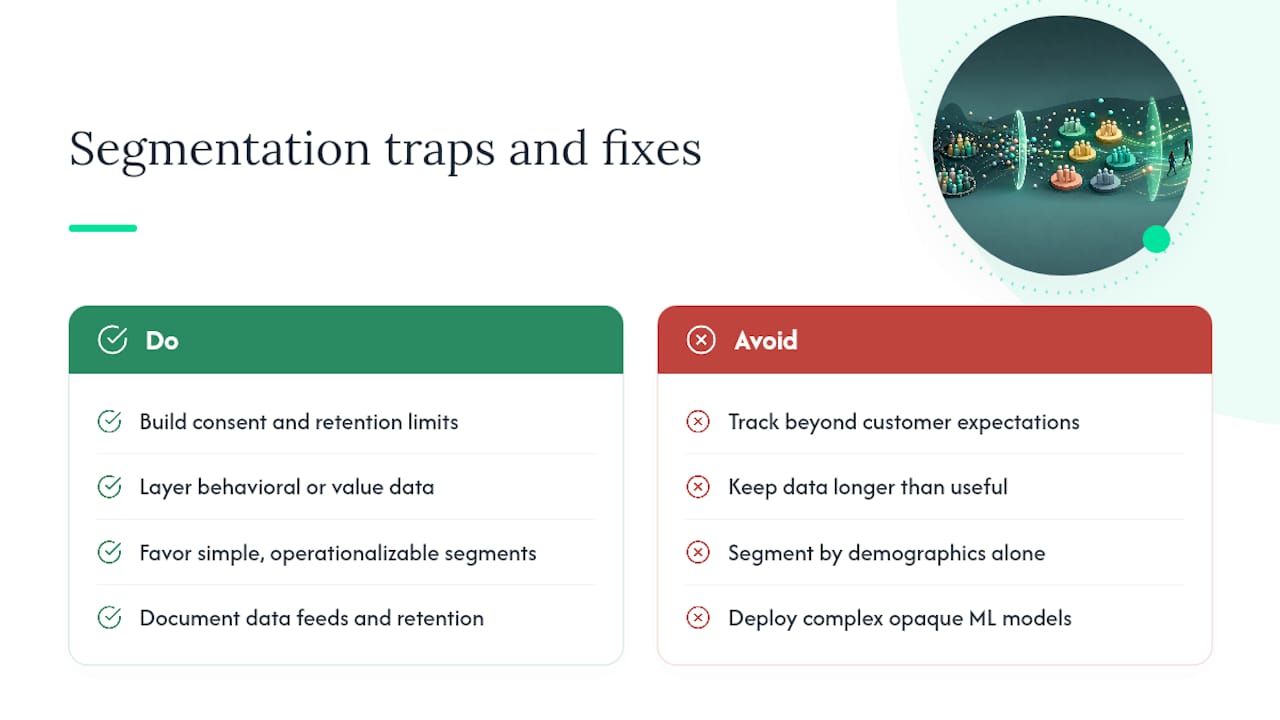
Demographic-only segmentation carries a quieter risk: bias. Grouping customers purely by age, gender, or zip code can encode assumptions that have nothing to do with actual buying behavior, and it can shortchange customers who don't fit the stereotype of their group. Layering behavioral or value-based data on top of demographic data corrects for a lot of this, because it grounds the segment in what someone actually does rather than who they appear to be on paper.
Complexity is the third trap. A nine-cluster ML model that no one on your team can explain to sales is worse than a four-segment RFM model everyone understands and acts on daily. Favor the segmentation your team will actually operationalize, and put guardrails around every model: document what data feeds it, set a retention window, and require a human to review any segment before it drives an automated decision at scale.
— Bernard
Turn These Models Into Signal Engine Playbooks
There are platforms that automate the customer segmentation and campaign process, scoring leads by buying intent, flagging churn risk, and firing off email and SMS win-back sequences automatically.
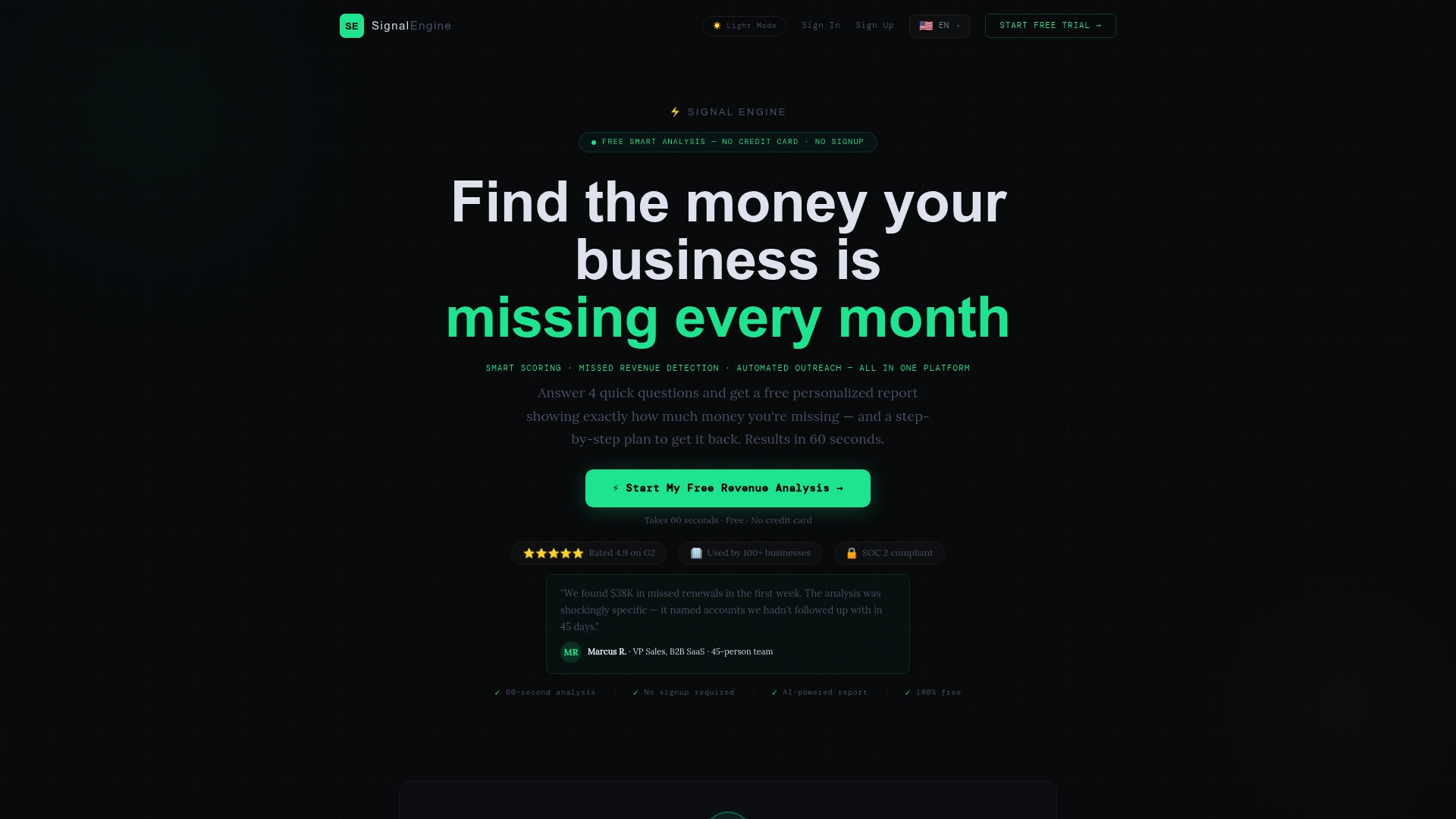
Signal Engine Free gets you started with the core scoring layer described in this guide, no engineering team required. The paid tiers add automated churn prediction, competitor monitoring, and campaign automation on top, so the "label clusters, map to campaigns" step from earlier isn't a manual project every quarter. Check out a live demo to see how the scoring and automation work together, or start your free trial today and have a working segment feeding a live campaign inside a week.
Sources
- What is customer segmentation? | Databricks Blog
- Customer segmentation — Coursera article
- Creating actionable customer segmentation models | Google Cloud blog
FAQ
What Are the Four Types of Customer Segmentation?
The four foundational types are demographic, geographic, psychographic, and behavioral segmentation. Most practical programs add value-based, firmographic, and technographic segmentation as data and B2B needs grow.
What Are the Seven Types of Market Segmentation?
The seven commonly cited types are demographic, geographic, psychographic, behavioral, firmographic, technographic, and value-based segmentation, each using different data and methods ranging from simple rules to machine learning clustering.
What Is the Kotler STP Model?
STP stands for Segmentation, Targeting, and Positioning: you segment your market into groups, target the groups worth pursuing, then position your product or message specifically for those groups. It's a strategic framework that sits above the specific models like RFM or clustering covered in this guide.
What Are the Different Types of Customer Segments?
Common segment types include high-value or "champion" customers, at-risk or churning customers, new or onboarding customers, and dormant or lapsed customers, most often produced by RFM or lifecycle models. Tools like Signal Engine automate the scoring behind these labels so segments update continuously instead of going stale between manual reviews.
Do I Need Machine Learning to Segment Customers Effectively?
No. RFM and rule-based lifecycle segmentation cover most retention and win-back use cases with only transaction data and a spreadsheet or SQL. Clustering and ML add value once you have enough clean behavioral data to make discovery worthwhile, typically a few thousand active customers.
Ready to Stop the Revenue Leak?
Signal Engine gives small and local businesses 31 AI-powered tools to score leads by buying intent, predict churn before it happens, auto-generate email and SMS campaigns, and recover missed calls automatically — all in one dashboard starting at $49/month.
Start your free 7-day trial — no credit card required. Setup takes 5 minutes.