

TL;DR:
- Email automation in 2026 functions mainly as a signal-detection and timely response layer, not a broadcast channel. It identifies early churn signals and routes high-risk accounts to humans, improving retention through personalized, behavior-triggered messaging. Most SMBs should define clear goals, focus on quality signals, and measure success with revenue-based KPIs before scaling automation.
Email automation in 2026 is primarily a signal-detection and timely-nudge layer — not a broadcast channel. It catches early churn signals, delivers context-rich automated responses, and routes high-risk accounts to human teams before revenue walks out the door. For SMBs, that distinction changes everything about how you build sequences.
Three things this layer does when built correctly:
- Detects churn signals from product usage, engagement drops, and support ticket spikes
- Automates low-touch interventions personalized to each customer's behavior
- Escalates high-risk accounts to a CSM or account executive with a task and context attached
Stacked automation workflows — onboarding, re-engagement, and expansion running in parallel — can significantly improve retention results when sequenced correctly.
Table of Contents
- How does email automation actually improve retention?
- Start here: define your retention goal before you build anything
- How modern AI-driven email automation works
- Practical SMB retention workflows you can copy
- What should you measure to prove automation is working?
- What should you look for in a retention-focused email tool?
- SMB implementation checklist and realistic timeline
- Key Takeaways
- What most people get wrong about email automation and retention
- Ready to Stop the Revenue Leak?
- FAQ
How does email automation actually improve retention?
Timing and context determine whether a customer stays. Send the right message three days late, and it reads like a form letter. Send it the moment a usage metric drops, and it reads like you were paying attention.
The mechanics work like this: inputs (product usage, NPS scores, support tickets, email engagement) feed into a scoring model. That model fires trigger rules, which populate personalized templates and, when thresholds are breached, create escalation tasks for humans. Behavioral triggers drive better engagement than batch sends because they feel like responses to customer actions, not broadcasts.
Concrete email automation benefits for SMBs:
- Earlier churn detection — flag at-risk accounts 7–14 days before a renewal event
- Higher engagement rates — triggered emails consistently outperform batch sends on open and click-through rates
- Lower cost-per-retained-customer — automation handles the low-touch tier so your team focuses on high-value saves
- Faster time-to-value for new clients — onboarding sequences close the gap between signup and first meaningful use
Pro Tip: Treat every automated send as triage. The goal is to surface accounts that need a human, not to replace humans entirely. AI finds the problem; your team closes the case.
Start here: define your retention goal before you build anything
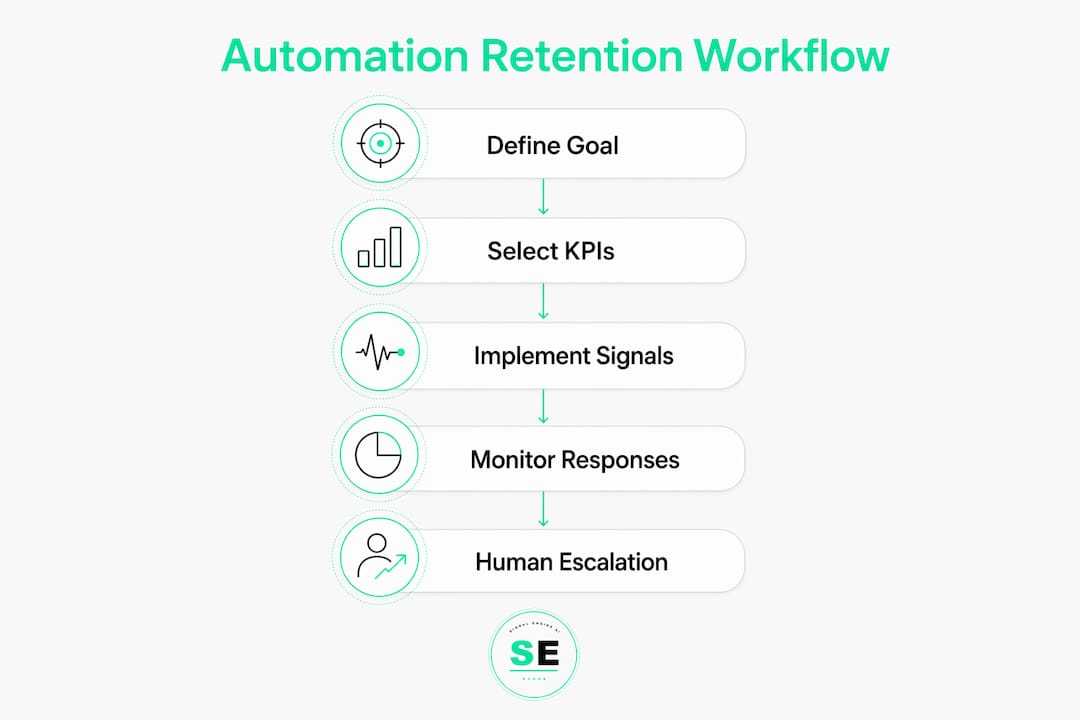
Salesforce notes that SMBs most often fail at automation because they build sequences before defining what success looks like. Fix that first.
A specific retention goal sounds like: "Reduce 90-day churn by 15% for customers in their first contract year." Not "improve retention." Specific goals give your automation a measurable exit condition.
Use this checklist before you write a single email:
- Target cohort — which customer segment are you protecting? (new signups, annual renewals, at-risk accounts)
- Time window — 30, 60, or 90 days?
- Primary metric — gross retention rate, net revenue retention, or time-to-first-value?
- Owner — who owns the escalation rule and the CSM hand-off?
- Success criteria — what number, by what date, confirms the automation is working?
Pick KPIs that tie to revenue: 30/60/90-day retention rate, expansion conversion rate, and reply rate to CSM outreach. Open rates alone tell you nothing about whether customers are staying.
How modern AI-driven email automation works
Modern retention systems combine behavioral signals with predictive scoring to decide who gets automation versus who gets a human call. That decision logic is where most SMB tools fall short.
Signal types that matter:
- Product usage (weekly active users, feature adoption rate, session frequency)
- Account health (support ticket volume, champion turnover detected via CRM seat changes)
- Email engagement (open decay, reply rate trends)
- External enrichment (LinkedIn job-change signals for B2B champion risk)
Dense, product-level signals produce more accurate AI personalization. Shallow signals — like "hasn't opened an email in 30 days" — generate generic messages that can accelerate churn rather than prevent it.
Trigger logic patterns:
- Threshold-based: X% drop in weekly usage fires a check-in sequence
- Time-based: 14 days of inactivity opens a re-engagement window
- Milestone-based: first-value achieved triggers an expansion prompt
Escalation flow: automated email → no response in 48 hours → automated follow-up → still at-risk → CSM task created in CRM with account context attached. Every escalation needs a named owner and an SLA, or it disappears.
Pro Tip: Use AI for signal detection and send-time optimization. Require human-verified copy for any message that touches a renewal, a complaint, or a high-value account. The stakes are too high for hallucinated specifics.

Practical SMB retention workflows you can copy
Run three parallel stacks. Each has a named owner, explicit entry/exit rules, and its own metric.
Timing table:
| Workflow | Trigger | Day 1 | Day 3–5 | Day 7–14 | Escalate |
|---|---|---|---|---|---|
| Onboarding | Signup | Welcome + setup tip | Feature highlight | Check-in / value confirmation | Day 14 if no first-value action |
| Re-engagement | 14 days inactivity | "We noticed you've been quiet" | Use-case reminder | Win-back offer | Day 30 if no reply |
| Expansion | Usage threshold hit | Upgrade prompt | Case study / social proof | CSM intro | If no response in 7 days |
Tone guidance: short, helpful, data-driven. Reference the customer's actual behavior ("You haven't used X feature yet — here's why it matters for your workflow"). Never send a generic "just checking in."
Metrics to track per workflow:
- Onboarding: activation rate, time-to-first-value
- Re-engagement: reactivation conversion rate, reply rate
- Expansion: upgrade conversion rate, expansion revenue
Common mistakes that kill results: over-mailing (more than one touch every 3–4 days in a single workflow), AI-generated specifics that are factually wrong, and no defined CSM hand-off rule when automation fails to get a response.
What should you measure to prove automation is working?
Measure retention by revenue and cohort lift, not by open rates alone.
| Metric | Definition | Target window |
|---|---|---|
| Net revenue retention (NRR) | Revenue from existing customers including expansion, minus churn | Monthly / quarterly |
| Gross retention rate | % of customers retained, excluding expansion | 30 / 90 days |
| Cohort retention | Retention rate for a specific signup or renewal cohort | 30 / 60 / 90 days |
| Time-to-first-value (TTV) | Days from signup to first meaningful product action | Per onboarding cohort |
| Expansion revenue | Upsell/cross-sell revenue generated from existing customers | Monthly |
A/B and holdout test checklist:
- Split your cohort: 80% receive automation, 20% held out as a control group
- Run the test for a full 90-day window before reading results
- Primary metric: 90-day retention rate or NRR against the holdout
- Guardrails: monitor unsubscribe rate and spam complaint rate weekly
- Roll out to the full population only after the lift clears a meaningful threshold in the test cohort
Hold-out groups are non-negotiable — without a control cohort, you cannot separate automation lift from seasonal trends or product changes.
What should you look for in a retention-focused email tool?
Prioritize tools that deliver predictive signals, lightweight setup, and clear escalation paths. Fancy creative features rank last.
Vendor criteria checklist:
- ✅ Predictive churn scoring built in (not just rule-based triggers)
- ✅ Product-data ingestion via event stream or API
- ✅ Native CRM integration with task creation on escalation
- ✅ Easy trigger logic builder (no-code or low-code)
- ✅ Affordable pricing tiers built for SMB budgets
- ✅ Holdout/testing support
- ✅ AI personalization controls with human override
A dedicated signal and scoring layer matters specifically for SMBs that lack a full analytics team. Without it, you are writing trigger rules based on gut feel rather than scored risk.
Signalengine's approach — watching customer behavior continuously, scoring churn risk automatically, and flagging accounts before they go dark — gives SMB teams the early-warning window they need to act. The platform documents real SMB implementations across HVAC, logistics, dental, and SaaS verticals, where automated churn intervention outreach routes at-risk accounts to the right human at the right moment.
SMB implementation checklist and realistic timeline
A minimal, reliable implementation takes 4–8 weeks when you focus on one cohort and one workflow first.
| Week | Milestone | Owner |
|---|---|---|
| — | Define retention goal, metric, and escalation owner | Business owner / ops lead |
| 1–2 | Instrument signals; map trigger logic | Developer / ops |
| 3 | Write and QA email templates; set up holdout group | Lifecycle marketer |
| 4–6 | Run holdout test; monitor guardrail metrics weekly | Analytics / CSM |
| 7–8 | Iterate on underperforming triggers; scale to full cohort | All |
Role checklist:
- Owner — accountable for escalation SLA and monthly audit
- CSM / account manager — receives escalation tasks and closes high-risk cases
- Lifecycle marketer — writes and QAs templates
- Developer / ops — instruments event data and builds trigger logic
- Analytics — reads cohort results and calls the rollout decision
Start small. One cohort, one workflow, one owner. Run a monthly automation audit to catch volume creep before it becomes a trust problem.
Key Takeaways
Email automation works as a retention tool when it functions as a signal-detection layer first, a messaging channel second, with human escalation built into every high-risk path.
| Point | Details |
|---|---|
| Signal detection first | Treat automation as triage — AI flags at-risk accounts; humans close the high-stakes cases. |
| Define goals before building | Set a specific metric (e.g., reduce 90-day churn) and name an owner before writing a single email. |
| Run three parallel workflows | Onboarding (day 1–14), re-engagement (14–30 day inactivity), and expansion (usage threshold) stacked together drive the strongest lift. |
| Measure NRR and cohort lift | Open rates alone prove nothing; net revenue retention against a holdout cohort proves automation is working. |
| Signalengine for SMBs | Signalengine scores churn risk automatically and routes at-risk accounts to your team — starting at $49/month. |
What most people get wrong about email automation and retention
The conventional wisdom says "automate more touchpoints and retention improves." That is backwards. More automation without better signals produces more noise, and noise accelerates churn among your best customers — the ones who notice when a message is generic.
The real leverage is upstream: the quality of the signal that fires the trigger. A message sent because a customer's weekly active usage dropped 40% in seven days lands completely differently than one sent because they "haven't opened an email in 30 days." One is a response to behavior. The other is a broadcast wearing a trigger's clothing.
SMBs specifically should resist the temptation to build complex multi-branch sequences before they have clean product data feeding the system. Start with one signal, one trigger, one workflow. Prove lift against a holdout. Then scale. The teams that skip that discipline end up with automation that runs on autopilot, sending messages nobody reads, to customers who are already gone.
Ready to Stop the Revenue Leak?
Signal Engine gives small and local businesses 31 AI-powered tools to score leads by buying intent, predict churn before it happens, auto-generate email and SMS campaigns, and recover missed calls automatically — all in one dashboard starting at $49/month.
If your retention automation is running on batch sends and gut-feel triggers, you are leaving recoverable revenue on the table every month. Signalengine watches your customers continuously, scores their risk automatically, and tells your team exactly who to call and when — without you having to dig through dashboards.
Start your free 7-day trial — no credit card required. Setup takes 5 minutes.
FAQ
What is the role of email automation in customer retention?
Email automation acts as a signal-detection layer that catches early churn indicators, delivers timely personalized messages, and escalates high-risk accounts to human teams before customers leave.
How do behavioral triggers improve retention email performance?
Behavioral triggers fire messages in response to specific customer actions rather than on a fixed schedule, making emails feel relevant rather than generic — which drives higher engagement and reduces churn risk.
What KPIs should SMBs track to measure email automation's impact on retention?
Track net revenue retention, gross retention rate, and cohort retention at 30 and 90 days. Open rates alone do not confirm whether customers are actually staying.
How long does it take an SMB to implement retention email automation?
A focused implementation covering one cohort and one workflow takes 4–8 weeks, including signal instrumentation, template creation, and a holdout test to confirm lift.
How does Signalengine support SMB retention automation?
Signalengine scores customer churn risk automatically, flags at-risk accounts before they go dark, and routes escalations to your team — covering the signal-detection layer that most standalone email tools lack.