

The strongest upsell signals fall into five buckets: usage hitting a hard limit, active feature adoption, a milestone or KPI win, an internal champion talking you up, and a budget or new-project mention landing at the right time. The immediate move is simple: score whatever signal you just spotted, log it as a task in your CRM, and either schedule a quick consultative check-in or a formal quarterly business review. Everything below is the taxonomy, the scoring rubric, and the scripts to make that repeatable.
TL;DR:
- Most upsell signals are quiet indicators like quota breaches, new admin requests, or positive NPS responses that are often overlooked in support tickets or call transcripts.
- Scoring signals based on strength, reliability, immediacy, and potential value helps prioritize accounts for immediate follow-up or nurturing based on their overall readiness.
- Automating capture from sources like support tickets, telemetry, and billing events ensures signals are promptly turned into CRM tasks, reducing missed opportunities.
- Clear ownership—CSMs handle behavioral and advocacy signals, AEs address financial cues, and technical limits are escalated swiftly—accelerates effective account action.
- Regularly reviewing soft mentions and soft signals, even if they seem minor, can uncover growth opportunities before explicit requests or almost-expired signals occur.
Table of Contents
- What Counts as an Upsell Signal?
- How Do You Score and Prioritize Upsell Signals?
- What Should Account Teams Do When a Signal Fires?
- How Do You Automate Upsell Signal Capture?
- Bernard's Take: The Blind Spots That Cost Teams the Most Revenue
- Ready to Stop the Revenue Leak?
- Sources
- FAQ
What Counts as an Upsell Signal?
An upsell signal is any observable behavior, comment, or data point suggesting an account is ready to spend more with you. Some are loud. A procurement team asking about your enterprise tier is impossible to miss. Others are quiet, buried in a support ticket or a throwaway line in a QBR transcript, and those are the ones most account teams let slip through.
Break signals into five categories, and you will catch far more of them.
Behavioral signals show up in how people use your product day to day. A daily-active-user count climbing steadily, a single login turning into a five-person team account, or a customer suddenly requesting admin permissions for new hires all point toward growth inside the account.
Usage and quota signals are the closest thing to a guaranteed buying trigger. API throttling, hitting a seat cap, maxing out storage, or repeatedly bumping against a transaction limit tells you the customer has outgrown their current plan, whether they say so or not.
Product-success signals come from wins you can point to directly. A customer reporting a measurable KPI improvement, finishing an onboarding milestone ahead of schedule, or asking to expand a pilot into other departments are all cues that the value case is already proven internally.
Financial and buying signals are the most explicit and often the most time-sensitive. Listen for mentions of new budget cycles, a freshly funded project, or questions about procurement timelines. These tend to cluster around fiscal quarters, so timing matters as much as the mention itself.
Advocacy signals are the ones customer experience data backs most heavily. Accounts with strong promoter scores spend more and stick around longer, according to Harvard Business Review's analysis of customer experience value. A high NPS response, an unsolicited reference, or a champion introducing you to a peer team all belong here.
- Behavioral: rising DAUs, multi-seat expansion, new admin requests
- Usage/quota: API throttling, seat caps, storage or transaction limits
- Product-success: KPI wins, milestone completion, pilot expansion requests
- Financial/buying: budget cycle mentions, new project funding, procurement questions
- Advocacy: high NPS, references, cross-team praise
Don't ignore the soft mentions either. A line like "we might need that later" buried in a support ticket rarely triggers action today, but tagging it and revisiting it in 60 to 90 days catches deals that a one-and-done scan would miss entirely.
How Do You Score and Prioritize Upsell Signals?
Not every signal deserves a call today. A rubric keeps your team from chasing noise while missing the account that's actually ready to buy.
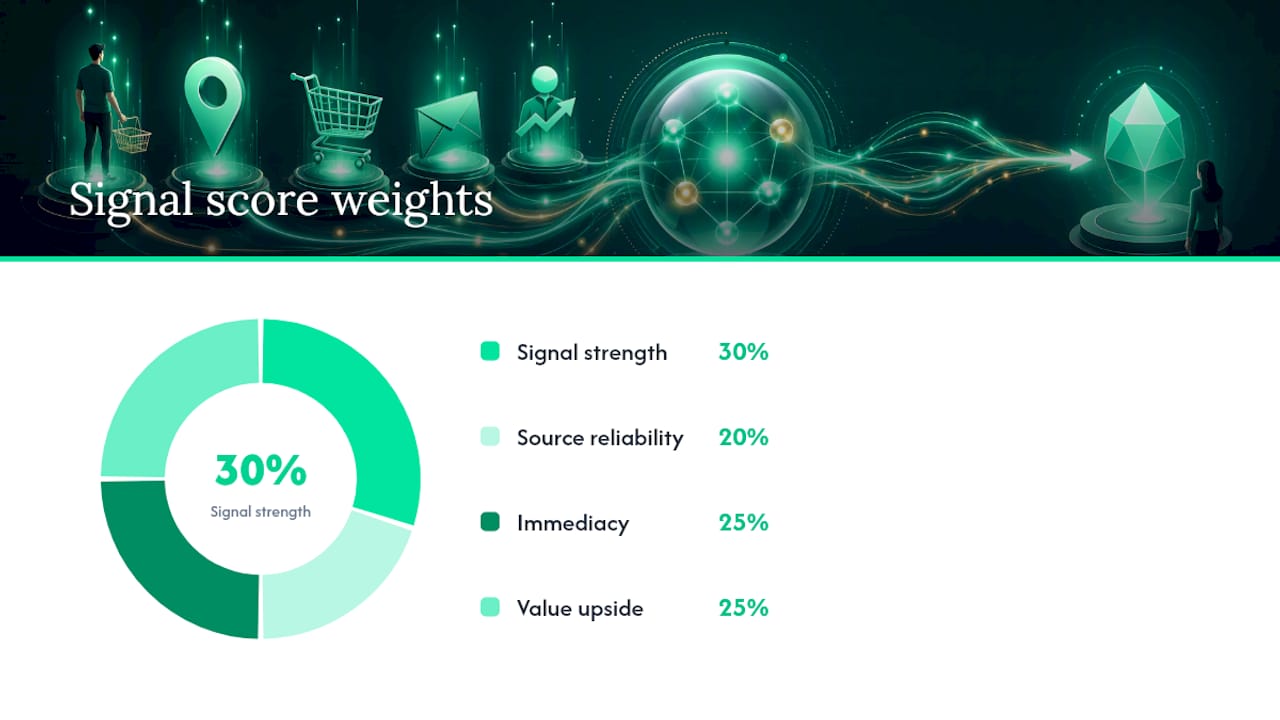
Score every signal across four dimensions:
- Signal strength. Rate it soft to explicit. A backlog comment is soft; a procurement question is explicit.
- Source reliability. Weight where it came from: usage telemetry and billing events tend to be more reliable than a single offhand remark in a support ticket.
- Immediacy. Ask how time-sensitive it is. A quota breach demands action this week; a budget mention tied to next year's planning cycle does not.
- Value upside. Estimate the size of the expansion. A single extra seat is not the same opportunity as a company-wide rollout.
Assign each dimension a weight, say 30% for strength, 20% for source reliability, 25% for immediacy, and 25% for upside, then multiply by a 1 to 5 rating on each. A composite score above roughly 3.5 out of 5 warrants immediate outreach. A score between 2.5 and 3.5 goes into a nurture sequence with a 30 day follow-up. Anything below 2.5 gets logged and monitored quarterly, not acted on.
Calibrate the thresholds after your first few cycles. If half your "immediate outreach" accounts go cold, your weights are off, most likely too generous on immediacy. Run a short A/B test: split similar-scoring accounts into an outreach group and a monitor-only group, then compare expansion rates after 60 days.
Pro Tip: Track false-positive rate as its own metric. If more than a third of your top-tier signals produce no meeting or no response, tighten your source-reliability weighting before adding more signal types.
What Should Account Teams Do When a Signal Fires?
Ownership has to be decided before the signal ever appears, not scrambled together after. As a rule of thumb: the CSM owns behavioral and usage signals, the AE owns financial and buying signals, and implementation flags anything tied to a technical limit. Escalate to the AE the moment a usage signal crosses into "they're asking about pricing" territory.
Assign and act:
- CSM handles adoption and advocacy signals, opens with a value-review conversation
- AE handles budget, procurement, and quota-driven signals, opens with a consultative pricing discussion
- Implementation flags technical ceiling events (API limits, storage caps) straight to the AE within 24 hours
Once ownership is clear, move fast on message following a proven sales onboarding checklist to ensure consistent handoffs and timely follow-up. Three templates cover most situations:
- Email subject line: "Noticed your team hit [specific milestone], let's talk next steps." Body should reference the exact usage number or KPI win, then propose a 15 minute call, no generic upgrade pitch.
- CRM task note: "Signal: [quota/KPI/budget mention]. Source: [ticket/call/telemetry]. Score: [X/5]. Suggested action: [outreach type] by [date]."
- In-call opener: "I saw you're close to your [limit type], want to walk through what the next tier unlocks for your team?"
Shopify's guidance on upselling backs a consultative version of this approach: wait until the customer has already seen value, sell the outcome rather than the feature list, and offer a limited trial of the higher tier instead of pushing a hard close, a method Shopify details in its own upselling guide. Zendesk's research on proven sales techniques makes the same point about trust and timing mattering more than the pitch itself.
Track one primary metric: expansion conversion rate (signals acted on that convert to a paid upgrade within 90 days). Run it as a rolling test, comparing template variants monthly, and retire whichever underperforms.
How Do You Automate Upsell Signal Capture?
Most upsell signals never reach a CRM because nobody is reading every support ticket or call transcript looking for them. That's the real gap, not a lack of signals but a lack of capture.
Four data sources carry most of the volume:
- Call and QBR transcripts, where champions casually mention new projects or team growth
- Support tickets, where quota complaints and feature requests hide
- Product telemetry, tracking logins, seat counts, and API usage against plan limits
- Billing events, flagging near-limit usage before it becomes a support complaint
The workflow that turns this into revenue follows a consistent pattern: capture the raw text or event, classify it against a defined taxonomy (new team, quota hit, new project, budget mention), apply your scoring weights, auto-create a CRM task with the original quote attached, and draft outreach language for the AE to review before it goes out, a structure Demodesk outlines in its work on AI-driven upsell detection. Atlassian's own guidance on identifying upsell opportunities follows a similar transcript-to-recommendation path.
The gap isn't a shortage of signals. It's that most of them sit in a support ticket or call transcript nobody revisits, while the account quietly outgrows its plan and nobody notices until renewal.
An AI revenue intelligence platform can build this exact workflow into one dashboard: buy-readiness scoring pulled from usage and conversation data, churn prediction running alongside it so you're not just chasing expansion while missing risk, and drafted next-step outreach waiting for one-click approval instead of a blank email screen. For teams juggling dozens of accounts with no dedicated revenue-ops headcount, that's the difference between a signal that gets acted on this week and one that surfaces during a renewal call, too late to matter.
Bernard's Take: The Blind Spots That Cost Teams the Most Revenue
Three mistakes show up again and again. First, cross-team signals get lost. Support sees the quota complaint, sales never hears about it. Second, teams only react to explicit asks and miss the quieter behavioral shifts that predate them by weeks. Third, routing is an afterthought, so a hot signal sits in a ticket queue instead of an AE's task list.
Run this checklist weekly: review usage-limit alerts, scan recent support tickets for expansion language, check NPS responses for promoter scores, confirm CRM tasks match live signals, verify ownership on anything scored above threshold, and revisit soft mentions flagged 60 days ago. It takes fifteen minutes and catches what dashboards alone won't.
— Bernard
Ready to Stop the Revenue Leak?
Signal Engine gives small and local businesses 31 AI-powered tools to score leads by buying intent, predict churn before it happens, auto-generate email and SMS campaigns, and recover missed calls automatically, all in one dashboard starting at $49/month. Automating signal capture means the quota breach, the champion's offhand comment, and the budget question all land as a CRM task instead of getting lost in a transcript nobody rereads. Explore the Growth plan details or compare full plan pricing to see which tier fits your team's account volume.
Start your free 7-day trial — no credit card required. Setup takes 5 minutes.
Sources
- The value of customer experience, quantified — Harvard Business Review
- What is upselling? — Shopify blog
- Upsell detection with AI agents — Demodesk
- How to upsell: proven sales techniques — Zendesk
FAQ
What Are Some Good Upselling Examples?
A support ticket where a customer complains about hitting a storage cap is a strong example, so is a QBR where a champion mentions rolling your product out to another department. Both point to a plan upgrade the customer already needs, not one you're inventing.
What Are the 5 C's in Selling?
Definitions vary across sales training programs, but a common version covers Customer, Company, Competitors, Collaborators, and Climate, the factors a rep should understand before positioning any offer, including an upsell.
What Is the 2 2 2 Rule in Sales?
The 2 2 2 rule is a follow-up cadence: check in 2 days, 2 weeks, and 2 months after a key touchpoint. Applied to upsell signals, it works well for nurturing mid-tier scores that aren't urgent but shouldn't be dropped either.
What Are the 7 C's in Sales?
Like the 5 C's, the 7 C's framework varies by source, but versions commonly include Clarity, Credibility, Consistency, Connection, Conviction, Context, and Closing, principles that apply directly to how you frame an upsell conversation once a signal fires.
How Does Signal Engine Help With Upsell Signals?
Signal Engine Growth scores accounts on buy-readiness using usage and conversation data, then drafts the next outreach step for one-click approval, cutting the gap between when a signal appears and when someone acts on it. Current pricing is listed on the Signal Engine pricing page.