

A high-impact client feedback loop runs weekly, assigns a named owner to every insight, and always closes with a customer-facing follow-up. That's the whole game. Everything else — channel selection, AI analysis, prioritization matrices — exists to make those three things happen reliably.
Here's what to do in the next 48–72 hours:
- Pick 2–3 collection channels (in-product micro-survey, churn interview, support ticket tagging).
- Name one owner for the feedback program. One person, not a committee.
- Set your inner-loop SLA: every flagged response gets a personal reply within 48 hours.
- Schedule one 30-minute customer interview this week.
- Book a recurring weekly huddle to triage themes into owners' backlogs.
Pro Tip: Hand this checklist to your operations lead today. The program lives or dies by whether someone owns it before the first survey goes out.
Key Takeaways
A closed-loop VoC program requires a named owner, a 48-hour inner-loop SLA, and a customer-facing follow-up for every shipped change — without all three, the program becomes a survey graveyard.
| Point | Details |
|---|---|
| Name one owner immediately | Assign a single program owner before the first survey launches; diffuse ownership kills follow-through. |
| Enforce the 48-hour SLA | Inner-loop responses must reach customers within 48 hours; track this as a weekly KPI from day one. |
| Close one loop before scaling | Ship one feedback-driven change and notify affected customers before expanding to more channels or segments. |
| AI analysis enables weekly cycles | AI thematic analysis compresses manual coding from days to minutes, making weekly feedback cycles operationally possible. |
| Signalengine automates the hard parts | Automated routing, churn prediction, and outreach sequences accelerate the six-week build for SMBs across 12 verticals. |
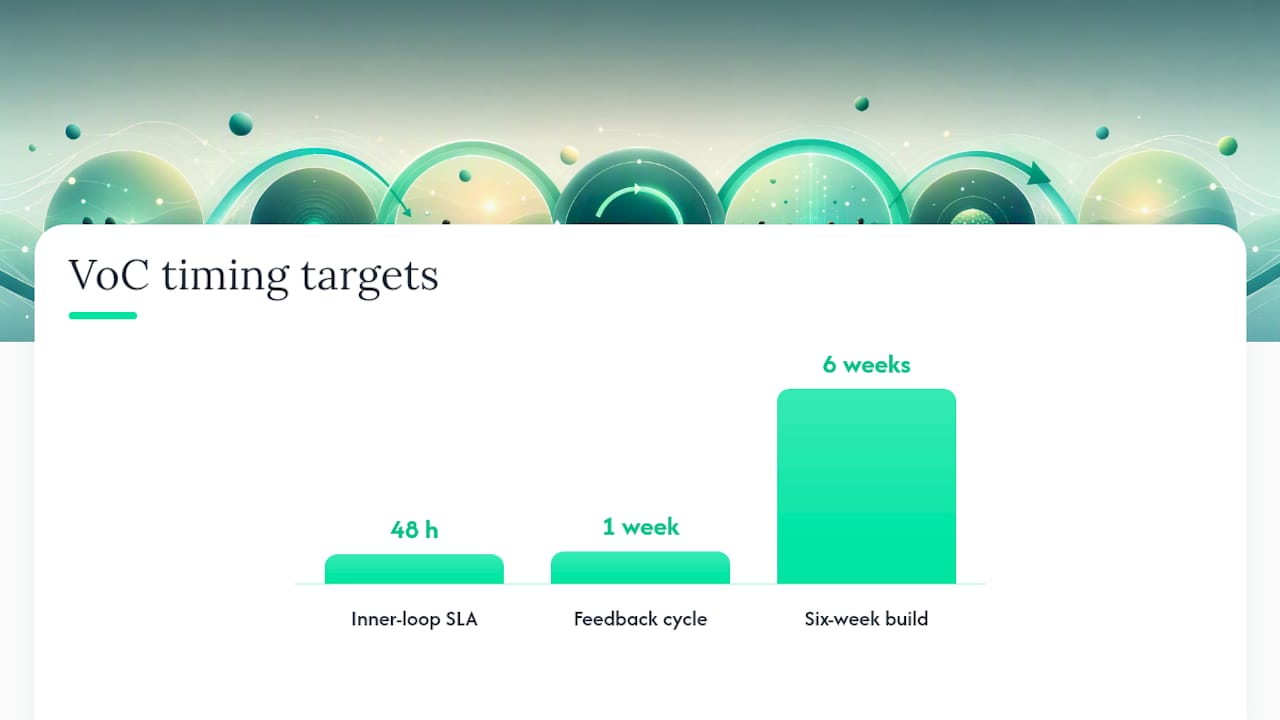
Table of Contents
- What is a client feedback loop and why does it matter?
- The four-stage framework: what success looks like at each step
- Inner loop vs outer loop: who owns what and when
- How to collect feedback without burning out your clients
- How to turn raw feedback into prioritized themes fast
- How to prioritize insights and assign owners
- How to close the loop with customers: templates and timing
- Common failure modes and how to prevent them
- Your six-week build: tasks, SLAs, and metrics
- Copy-ready templates, SLA snippets, and checklists
- What running feedback loops actually teaches you
- How Signalengine accelerates your closed-loop program
- Sources
- FAQ
- Ready to Stop the Revenue Leak?
What is a client feedback loop and why does it matter?
A client feedback loop is a four-stage operating cycle: collect input from customers, analyze it into prioritized themes, apply changes with named owners and deadlines, and close the loop by telling customers what changed. The cycle then repeats. That's the Voice of Customer (VoC) model in its operational form, and Koji's 2026 guide identifies closing the loop as the rarest and highest-impact stage.
Why does it matter for retention? Programs that close loops report measurable retention benefits, while organizations that only collect feedback create what practitioners call a "survey graveyard." Perspective AI's practitioner research finds that Many organizations collect feedback, but only a small percentage act on it, and fewer close the loop with customers.
Expected outcomes when you run all four stages:
- Reduced churn from faster detection and recovery of at-risk accounts.
- Faster product-market fit iteration because insights reach the roadmap weekly, not quarterly.
- Higher future response rates because customers see their input produce visible change.
- Cleaner prioritization because every theme carries a named owner and a deadline.
The four-stage framework: what success looks like at each step
Stage 1: Collect
Effective collection starts with a decision, not a question. Before you write a single survey prompt, identify which product or service decision the feedback will inform. That constraint forces you to ask targeted questions instead of generic satisfaction blankets.
Griffin and Hauser's VOC research, cited in Leaders Loop's VoC toolkit, shows that 20–30 well-run depth interviews surface the majority of core customer needs faster than large shallow surveys. Start with interviews, not scale.
Every collection flow needs three operational fields: a participant identifier (so you can follow up personally), explicit follow-up permission, and a routing key (account tier, product area, or segment) so the right owner receives the signal automatically.
Stage 2: Analyze
Raw feedback is noise until it's coded. Build a simple taxonomy — a codebook of 10–15 theme labels — and keep the customer's exact words attached to each theme. That quote is what makes a theme persuasive in a roadmap meeting.
Automatic thematic analysis tools collapse what used to take weeks of manual coding into hours. The outputs you need: theme name, frequency count, representative quotes, sentiment score, and segment breakdown. Without segment breakdown, you can't tell whether a complaint is universal or isolated to one account tier.
Stage 3: Apply
Every theme that clears your prioritization threshold gets one named owner and one deadline. Not a team. One person. Koji's operational guidance is explicit: log a concrete shipped change, not "we're aware of this issue."
Prioritization criteria, in order of weight:
- Reach — how many accounts or users does this theme affect?
- Revenue at risk — what's the ARR exposure if this goes unaddressed?
- Severity — is this a blocker or an annoyance?
- Strategic alignment — does fixing this accelerate a roadmap priority?
Stage 4: Close
Closing the loop means telling the customer what changed because of their input. A personal reply to the original respondent, a cohort announcement to the affected segment, and a release note that references the feedback theme. All three. HBR's foundational research reinforces why this matters: scores like NPS are thermometers, not diagnoses. The qualitative "why" and the visible follow-through are what build trust.
Inner loop vs outer loop: who owns what and when
Bain's Net Promoter System splits feedback response into two distinct motions, and conflating them is one of the most common program failures.
The inner loop is frontline, fast, and individual. A customer flags a problem; the account manager or CSM responds within 24–48 hours with a personal message. The goal is recovery and learning at the individual level. Bain's guidance specifies that follow-up should be immediate and specific to the smallest practical group — ideally the individual employee or pod responsible for that account.
The outer loop is systemic and cross-functional. When multiple inner-loop incidents share a root cause, a short "huddle" elevates them into a roadmap decision. Without this escalation path, programs default to the survey graveyard: scores tracked, nothing changed.
Pro Tip: If your inner-loop owner and your outer-loop owner are the same person, you have a bottleneck. Split the roles before you launch.
SLA and meeting cadence
| Loop | Owner | SLA Window | Meeting Cadence |
|---|---|---|---|
| Inner loop | CSM / Account Manager | 24–48 hours to first response | Daily triage, weekly review |
| Outer loop | Product / CX Lead | 1–4 weeks to owner assignment | Biweekly huddle, monthly steering |
| Escalation trigger | Program Manager | 48 hours to escalate unresolved inner-loop items | Ad hoc + monthly steering |
Programs that enforce these SLAs see measurably higher loop-close rates than those that treat response timing as optional. The SLA is the accountability mechanism, not a courtesy target.
How to collect feedback without burning out your clients
Channel selection
Limit yourself to 2–3 channels. More than that fragments your data and creates routing complexity that kills follow-through. Recommended channel mix:
- In-product micro-surveys (1–2 questions, triggered by a specific action or milestone).
- AI-moderated interviews (async or live, 15–20 minutes, for depth on a specific decision).
- Churn interviews (triggered automatically when a cancellation or downgrade signal fires — see churn signals worth tracking).
- Support ticket tagging (passive collection; tag tickets by theme as they close).
- Sales call notes (structured debrief template after every demo or renewal call).
Question design
Every question must link to a decision. "How satisfied are you overall?" links to nothing. "What almost stopped you from renewing?" links to retention strategy. Prefer targeted prompts over open-ended blanket asks, and cap each survey at 3–5 questions maximum.
Operational fields every collection flow must capture:
- Participant name and account ID (for personal follow-up).
- Explicit permission to follow up.
- A routing key (product area, account tier, or segment).
Pro Tip: *Run your first 20–30 responses as interviews, not surveys.
Frequency and fatigue
Survey fatigue is real and measurable: response rates drop when customers feel over-polled. A practical rule: no customer receives more than one survey per quarter from any single channel. Use passive channels (support tagging, call notes) to fill the gaps between active surveys.
How to turn raw feedback into prioritized themes fast
Build your taxonomy first
A codebook of 10–15 theme labels, written before analysis begins, keeps your team consistent. Label themes in the customer's language, not your internal jargon. "Onboarding too slow" beats "T1 activation friction" every time — the customer's phrasing is what makes the theme land in a roadmap meeting.
Keep the original quote attached to every coded theme. A theme without a quote is an abstraction. A theme with three customer quotes is evidence.
Why AI thematic analysis changes the math
Manual coding of 200 open-text responses takes a skilled analyst 8–12 hours. AI-assisted thematic analysis tools produce the same output in minutes, with sentiment scores and segment breakdowns included. That compression is what makes weekly feedback cycles operationally possible instead of aspirational. AI tools for client analysis covers the technical outputs in detail.
The outputs you need from any analysis tool:
- Theme name and frequency count.
- Representative customer quotes per theme.
- Sentiment score (positive, neutral, negative) per theme.
- Segment breakdown (by account tier, industry, or product area).
- Time-to-insight benchmark (how long from data ingestion to routable theme list).
Vendor evaluation checklist
When selecting a VoC or feedback analysis tool, score each candidate on:
- Integrations — does it connect to your CRM, helpdesk, and communication stack without custom dev work?
- Webhook routing — can it fire an alert to a named owner the moment a high-severity theme crosses a threshold?
- Thematic analysis quality — does it produce quotes, not just labels?
- Security and privacy — does it meet SOC 2 Type II or equivalent? Check Signalengine's security standards as a benchmark for what SMB-grade compliance looks like.
- Audit trail — can you prove what changed and when, for compliance or client reporting?
- Time-to-insight — how long from survey close to routable theme list?
Pro Tip: Ask vendors for a live demo with your own data, not a canned dataset. Time-to-insight claims vary wildly between marketing copy and actual performance.
How to prioritize insights and assign owners
The prioritization matrix
Not every theme deserves a sprint slot. Score each theme on four criteria, each rated 1–3:
| Criterion | What to measure | Weight |
|---|---|---|
| Reach | Number of accounts or users affected | High |
| Revenue at risk | ARR exposed if unaddressed | High |
| Severity | Blocker vs. friction vs. cosmetic | Medium |
| Strategic alignment | Fits current roadmap priority | Medium |
Themes scoring 9 or above get an owner and a deadline within 48 hours. Themes scoring 5–8 go into the next outer-loop huddle. Themes below 5 are logged and monitored for frequency growth.
Governance rules
- One named owner per insight. Not a team, not "product."
- Owner assignment logged in your CRM or VoC tool within 48 hours of theme surfacing.
- Every action entry must include: theme name, owner, deadline, and the specific shipped change or explicit "not now" decision with rationale.
- A recurring insights-review meeting (weekly or biweekly) where the program manager checks SLA adherence and escalates overdue items.
Pro Tip: Log "not now" decisions with rationale. When a customer asks why nothing changed, you need a defensible answer — not silence.
Owner-assignment template
Theme: [Theme name]
Accounts affected: [Count]
ARR at risk: [$]
Owner: [Full name]
Deadline: [Date]
Action: [Specific change OR "Not now — reason: ___"]
Proof point: [Link to release note, ticket, or announcement]
A "shipped change" proof point must include a link to a release note, a closed ticket, or a customer-facing announcement. "We're working on it" does not count.
How to close the loop with customers: templates and timing
Closing the loop is the stage most programs skip. Perspective AI's research identifies the "confirmation gap" as one of the three most common operational failures: the fix ships, but the customer never hears about it.
Personal follow-up (inner loop)
Send within 48 hours of receiving feedback. Minimum content:
- Address the customer by name.
- Quote or paraphrase their specific input.
- State the action taken — or explain clearly why no action was taken.
- Invite them to continue the conversation.
Sample closing email:
Cohort announcements (outer loop)
When a systemic fix ships, send a segment-level announcement to every account that raised the same theme. Use your CRM's segment filter to target precisely. Reference the feedback explicitly: "You told us X. Here's what we changed."
Release notes
Every release note tied to a feedback-driven change should include a one-line attribution: "Based on feedback from [N] customers in [segment]." That line costs nothing and compounds trust over time. Automated client reporting workflows can push these notes to the right accounts automatically.
Pro Tip: *Track follow-up coverage as a metric: what percentage of respondents received a personal reply within 48 hours?
Common failure modes and how to prevent them
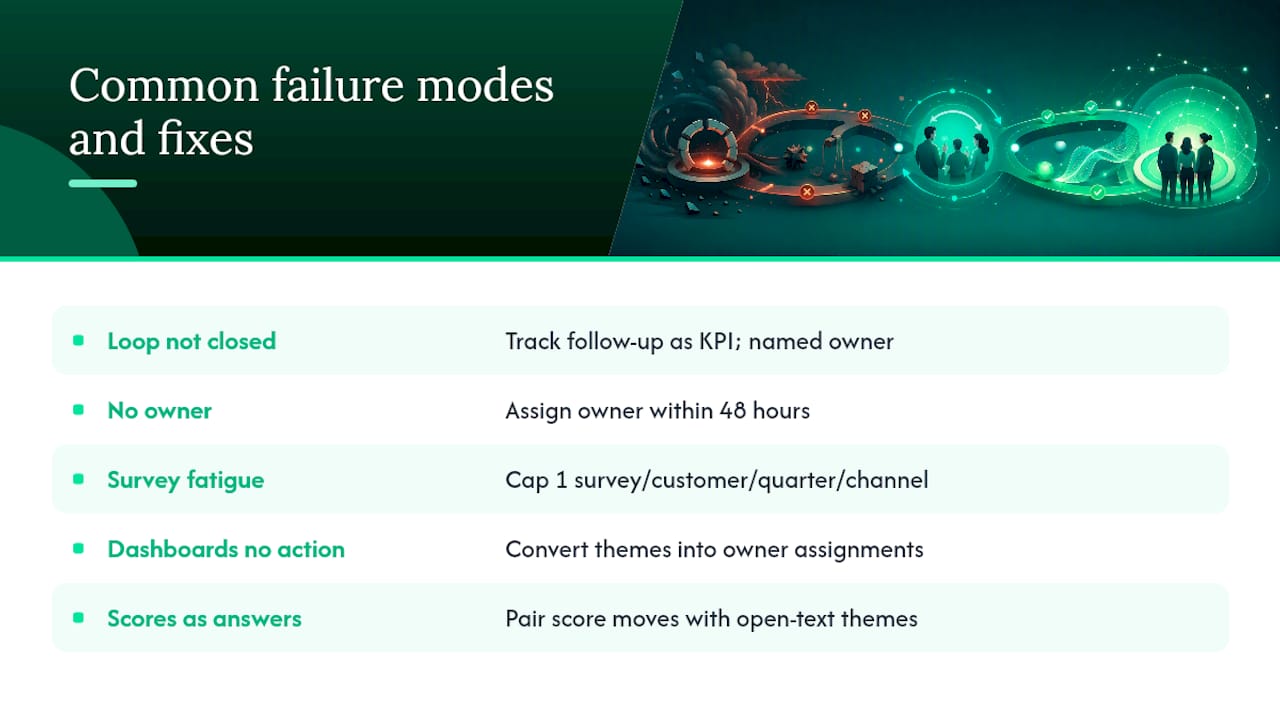
Most feedback programs fail in predictable ways. Here are the five most common, with a mitigation for each.
1. Not closing the loop. The fix ships; the customer never hears about it. Mitigation: make follow-up coverage a tracked KPI with a named owner. No close, no credit.
2. No named owner. Insights sit in a dashboard with no one responsible. Mitigation: the program manager assigns an owner within 48 hours of every theme that clears the prioritization threshold. Unassigned themes are escalated at the weekly huddle.
3. Survey fatigue. Response rates drop because customers are over-polled. Mitigation: cap active surveys at one per customer per quarter per channel. Use passive channels (support tagging, call notes) to fill gaps.
4. Dashboards with no action. Scores are tracked, themes are visible, nothing changes. This is the survey graveyard. Mitigation: the insights-review meeting exists specifically to convert themes into owner assignments. If no assignments are made, the meeting failed.
5. Treating scores as answers. An NPS drop triggers a meeting about the score, not about the qualitative "why." HBR's research is clear: single-number metrics are triggers, not diagnoses. Always pair a score movement with the open-text themes driving it.
Pro Tip: Run a quarterly "loop audit": pull every theme from the past 90 days and check whether each one has a shipped change, a "not now" decision, or an overdue owner. The audit takes 30 minutes and prevents program drift.
Operations checklist to prevent relapse
- Every theme has a named owner logged within 48 hours.
- Follow-up coverage tracked weekly (target: 80%+ for pilot).
- No customer receives more than one active survey per quarter.
- Weekly huddle has a standing agenda item: overdue owner assignments.
- Quarterly loop audit scheduled and owned.
Your six-week build: tasks, SLAs, and metrics
This is the plan you hand to a delivery lead. Each week has a primary task, a measurable output, and a go/iterate decision at the end.
Week-by-week plan
Week 1: Decision and channel setup
- Identify the one business decision the first loop will inform (retention, onboarding, renewal).
- Select 2 channels (recommend: in-product micro-survey + churn interview).
- Name the program owner and the inner-loop owner.
- Draft the collection instrument (3–5 questions, routing keys included).
Week 2: Taxonomy and tool onboarding
- Build your 10–15 theme codebook.
- Onboard your AI thematic analysis tool and run a test batch of 20–30 historical responses.
- Confirm webhook routing fires correctly to the inner-loop owner.
- Set up the owner-assignment log in your CRM.
Week 3: First live collection run
- Launch the survey or interview sequence to a pilot segment (50–100 accounts recommended).
- Run 10–15 depth interviews alongside the survey (Griffin and Hauser's VOC research supports this depth-first approach).
- Inner-loop owner responds to every flagged response within 48 hours.
Week 4: First analysis and prioritization
- Run AI thematic analysis on all Week 3 responses.
- Score themes on the prioritization matrix (reach, revenue at risk, severity, alignment).
- Assign owners to all themes scoring 9+.
- Hold the first outer-loop huddle: 30 minutes, themes to owners.
Week 5: First shipped change and close
- Ship at least one change driven by a Week 3 theme (even a small one).
- Send personal follow-ups to all respondents who flagged that theme.
- Send a cohort announcement to the full affected segment.
- Publish a release note with the feedback attribution line.
Week 6: Measure and decide
- Pull metrics: loop-close rate, time-to-close, follow-up coverage, theme-resolution rate.
- Run a 30-minute pilot retrospective with the inner and outer loop owners.
- Decision: go (scale to full customer base), iterate (fix one operational gap), or pause (if close rate is below 40%).
SLA reference
Kicue's VoC program design guide recommends starting by closing one loop well — a 48–72-hour callback to detractors — before scaling program breadth. That's exactly what Weeks 3–5 accomplish.
Copy-ready templates, SLA snippets, and checklists
Inner-loop response template
Outer-loop cohort announcement template
Release note blurb
Owner-assignment log (CRM entry)
Every entry must include:
- Theme name and date surfaced.
- Accounts affected (count and names if under 20).
- ARR at risk.
- Owner (full name).
- Deadline.
- Action taken or "not now" rationale.
- Proof point link (release note, ticket, or announcement URL).
SLA snippet for your SOP
Inner loop: All flagged responses receive a personal reply within 48 hours.
Owner assignment: All themes scoring 9+ on the prioritization matrix receive
a named owner within 48 hours of the weekly huddle.
Pro Tip: Paste the SLA snippet directly into your team's SOP document and your CRM's feedback workflow description. When SLAs live only in a slide deck, they get ignored.
What running feedback loops actually teaches you
The hardest lesson in running a feedback program isn't analytical — it's organizational. Early on, the most common failure is diffuse ownership: everyone feels responsible for feedback, so no one is. The moment you assign one named owner to the program and enforce the 48-hour inner-loop SLA, the entire dynamic shifts. Responses go out. Customers notice. Response rates climb.
The second lesson: start with one decision, not everything. Teams that launch with five collection channels and a 20-question survey instrument collapse under the weight of unroutable data. The programs that survive pick one decision — "why are customers churning in month 3?" — and close that loop completely before expanding. SLA adherence and loop-close rate are the only two metrics that matter in the first 90 days. Everything else is noise until those two are green.
How Signalengine accelerates your closed-loop program
Your six-week build works faster when the routing, outreach, and churn detection run automatically. Signalengine's revenue intelligence platform maps directly to the playbook above:
- Automated routing and webhooks fire the moment a high-severity theme or churn signal crosses your threshold, putting the right inner-loop owner on alert within minutes.
- Churn prediction flags at-risk accounts before they cancel, giving your inner-loop team a head start on recovery outreach. See how it works on the churn prediction page.
- Automated email and SMS campaigns handle cohort announcements and personal follow-up sequences without manual send queues.
- Pipeline analytics and deal intelligence surface which feedback themes are tied to revenue at risk, so your prioritization matrix has real ARR numbers behind it.
Built for SMBs across 12 verticals, Signalengine is priced to fit the budget of a growing business, not an enterprise. Book a live demo to see the routing and automation in action with your own data.
Sources
The following references informed this playbook. Each is worth reading in full for the depth it provides on its specific topic.
- The Net Promoter System's inner loop | Bain & Company
- Customer feedback loop guide 2026 | Koji
- Closing the Voice of Customer Loop in 2026: From Insight to Action | Perspective AI
- VoC Program Design Guide — Upgrading One-Off Surveys into an Operating Program | Kicue
- The one number you need to grow | Harvard Business Review
FAQ
What is a client feedback loop in simple terms?
A client feedback loop is a four-stage cycle: collect input, analyze it into themes, apply changes with named owners, and close by telling customers what changed. The cycle repeats weekly or monthly.
How often should you run a client feedback loop?
Weekly is the target for the inner loop (individual follow-up); the outer loop runs on a biweekly or monthly cadence for systemic fixes. AI thematic analysis makes weekly cycles operationally realistic.
What is the difference between the inner loop and the outer loop?
The inner loop is frontline and fast: a CSM or account manager responds to individual feedback within 24–48 hours. The outer loop is systemic: cross-functional teams fix root causes over weeks, guided by Bain's Net Promoter System governance model.
Why do most feedback programs fail?
Perspective AI's research shows roughly 95% of organizations collect feedback but only about 5% close the loop with customers. The most common failures are no named owner, no SLA enforcement, and never telling customers what changed.
How does Signalengine support a closed-loop feedback program?
Signalengine automates webhook-driven routing, churn prediction, and outreach sequences so inner-loop responses fire within minutes of a signal, and cohort announcements reach the right segment without manual work.
Ready to Stop the Revenue Leak?
Signal Engine gives small and local businesses 31 AI-powered tools to score leads by buying intent, predict churn before it happens, auto-generate email and SMS campaigns, and recover missed calls automatically — all in one dashboard starting at $49/month.
Start your free 7-day trial — no credit card required. Setup takes 5 minutes.