

CRM data hygiene is the ongoing discipline of keeping customer records accurate, deduplicated, and complete, not a one-time cleanup you run before a big presentation. The single move to make today: audit your decision-critical fields (owner, stage, contact email, deal amount) and run a duplicate scan. Poor data quality costs enterprises an average of $12.9 million a year, and tools like Signal Engine now automate the monitoring so that cost doesn't creep back in.
TL;DR:
- Regularly audit key fields such as owner, stage, contact email, and deal amount, and run duplicate scans to prevent costly data decay.
- Deduplication, validation, standardization, enrichment, archiving, and governance are ongoing activities that maintain data quality over time.
- Poor CRM data impacts forecasting, lead routing, deliverability, and automation, with fixing issues early costing roughly ten times less than after they occur.
- Address common issues like duplicate records, incomplete fields, inconsistent formatting, and stale contacts before they influence revenue or reporting accuracy.
- Automate monitoring and validation rules using tools like Signal Engine to reduce manual effort and ensure continuous data hygiene.
Table of Contents
- What Is CRM Data Hygiene, Exactly?
- Why Does CRM Data Hygiene Actually Move Revenue?
- What Are the Most Common CRM Data Problems?
- How Do You Build a CRM Hygiene Framework That Sticks?
- What Does a 30/90/180-Day Hygiene Rollout Look Like?
- Where Does Signal Engine Fit Into This Framework?
- Why Most Hygiene Advice Undersells the Cadence Problem
- Ready to Stop the Revenue Leak.
- Sources
- FAQ
What Is CRM Data Hygiene, Exactly?
CRM data hygiene is the continuous work of keeping your customer records accurate, current, and usable. It's not the same thing as data cleansing. Cleansing is the one-time scrub you do before a migration or a big campaign. Hygiene is what keeps the database clean between those scrubs, every week, forever.
Think of it like brushing your teeth versus getting a deep cleaning at the dentist. You still need the periodic deep clean. But skip the daily brushing and the deep clean just becomes damage control on a fixed schedule.
Six activities make up real hygiene work:
- Deduplication — merging or removing duplicate contact and account records so reps aren't calling the same lead twice.
- Validation — checking that data entered actually matches the format and business rules you require (a phone number that's actually 10 digits, an email that actually resolves).
- Standardization — enforcing consistent formats for names, states, industries, and deal stages so a report doesn't miss "CA" because someone typed "California."
- Enrichment — filling gaps with third-party or internal data (company size, revenue band, technographic details).
- Archiving — retiring dead leads and closed-lost accounts so they stop skewing your active pipeline math.
- Governance — the rules, owners, and cadence that keep the other five from decaying again.
That last one matters more than people think. A technical review of large-scale data cleaning describes the process as four linked stages: schema alignment, blocking, entity resolution, and canonicalization, essentially, agreeing on structure, grouping likely matches, deciding which records are actually the same entity, and merging them into one clean version. It's the same logic your CRM's dedupe tool runs, just formalized. CRM data hygiene, in practice, is running that pipeline continuously instead of once.
Why Does CRM Data Hygiene Actually Move Revenue?
Bad CRM data doesn't just look sloppy in a report. It changes decisions. A forecast built on stale close dates tells your VP of Sales a deal is closing this quarter when the prospect went dark six weeks ago. A lead routing rule keyed on "state" fails silently when half your records say "NY" and the other half say "New York," sending hot leads to the wrong rep or no rep at all.
Poor data quality costs organizations an average of $12.9 million annually, and most companies never come close to meeting basic data quality standards across their systems.
That number isn't abstract. It shows up in four concrete places inside a revenue org:
- Forecasting — dirty stage and amount fields make pipeline math directionally wrong, which means leadership makes hiring and spending calls on fiction.
- Routing and handoffs — duplicate or mismatched records send leads to the wrong owner, or to no owner, and speed to lead craters.
- Deliverability — stale or invalid emails inflate your bounce rate, which can tank sender reputation for your entire domain, not just one campaign.
- Automation — every workflow, sequence, and automated outreach trigger you've built runs on the assumption that the underlying field is accurate. Garbage in, garbage automated.
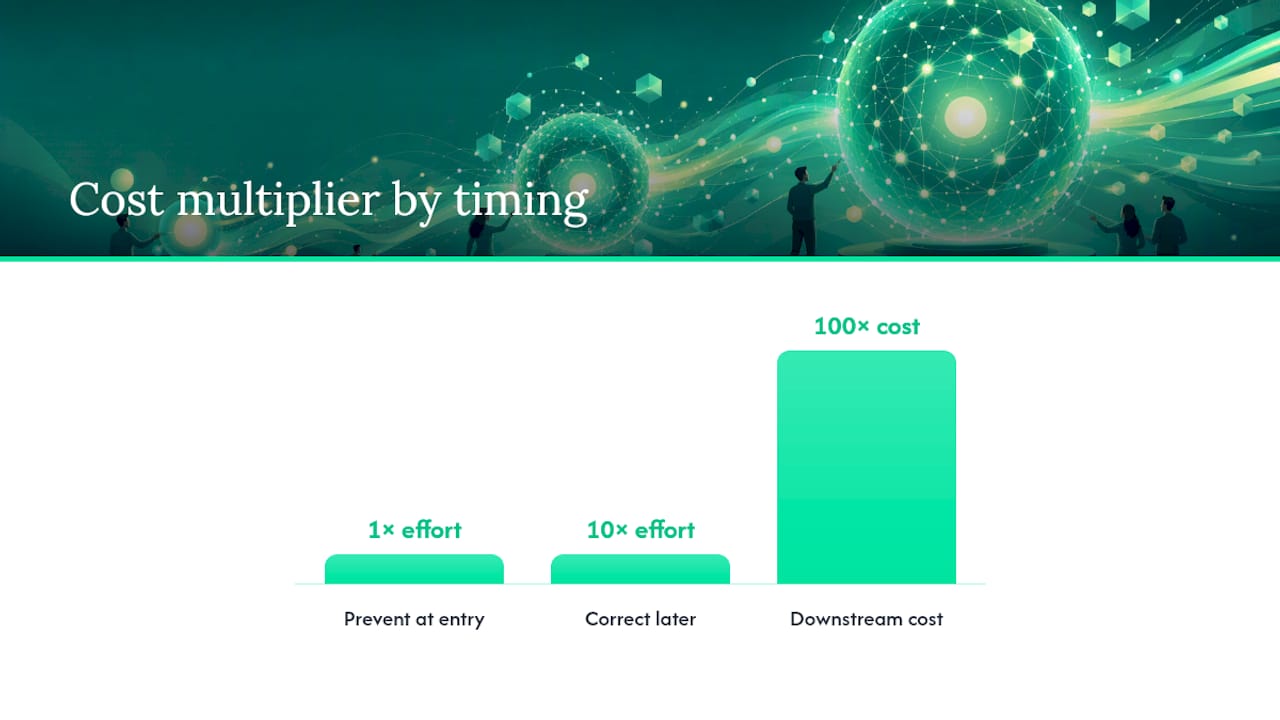
The economics behind fixing this early rather than late follow what's known as the 1-10-100 rule: preventing a bad record at entry costs roughly one unit of effort, correcting it later costs ten, and living with the downstream consequences (a lost deal, a compliance issue, a botched forecast) costs on the order of a hundred. Cleaning at the point of entry isn't just tidier. It's the cheapest version of the fix you'll ever get.
Forecast accuracy is one of the clearest places this shows up. If your pipeline math has ever been embarrassingly wrong at quarter close, the root cause is often sitting in messy CRM fields rather than a bad sales quarter.
What Are the Most Common CRM Data Problems?
Most hygiene issues fall into four recognizable buckets, and each one leaves fingerprints you can spot before they wreck a quarter.
- Duplicate records. The classic symptom is split activity: two reps working what's actually one account, each unaware of the other's calls and emails. You'll also see double outreach, the same prospect getting two "nice to meet you" sequences in the same week, which reads as sloppy at best and gets you marked as spam at worst.
- Incomplete or missing fields. Look for blank owner fields, missing close dates on open deals, or contact records with no email at all. These are often invisible until a report or automation trigger depends on that exact field and quietly fails.
- Inconsistent formatting standards. Free-text fields are the usual culprit, state names spelled three different ways, deal stages that don't match your official pipeline, phone numbers with and without country codes. This is what breaks segmentation and routing logic that assumes clean, consistent values.
- Stale records. Leads that haven't been touched in 90+ days but still sit in "active" status, or contacts at companies that no longer exist. These inflate your total pipeline count without contributing any real revenue.
To find these before they find you, pull a short list of queries:
- Count of records with matching email or phone across two or more contact IDs (your duplicate rate).
- Percentage of required fields populated across your top 500 open deals (your field completeness score).
- Email bounce rate from your last three campaigns, segmented by list age.
- Records with no activity logged in the last 60 to 90 days.
Integration and import errors deserve their own mention. Every time you connect a new tool, a form fills, or a spreadsheet gets bulk imported, you're creating a fresh opportunity for format mismatches and duplicate creation. If your CRM connects to multiple systems, that's exactly the kind of record fragmentation that a proper entity resolution pass is meant to catch.
How Do You Build a CRM Hygiene Framework That Sticks?
A one-time cleanup feels great for about six weeks. Then the same duplicates and blank fields creep back in, because nothing changed about how data enters the system in the first place. A real framework has five parts, and they have to work in order.
Standardize at the point of entry
Fix the schema before you fix the records. That means locking down required fields on your core objects (lead, contact, account, opportunity) and replacing free-text entry with picklists wherever a value has a finite set of options: deal stage, industry, lead source, state.
- Make deal amount and close date required to move a deal past stage one.
- Convert state, industry, and lead source to dropdown fields, not free text.
- Standardize naming conventions for accounts (no "Inc." in one record and "Incorporated" in another for the same company).
This single change prevents more bad data than any cleanup you'll ever run, because it stops the mess at the source instead of mopping it up downstream.
Deduplicate with clear merge rules
Deduplication isn't just "delete the newer one." You need matching rules (exact email match, fuzzy name plus domain match, phone plus company name) and merge rules that decide which record wins. The safest default: keep the record with the most complete activity history, and always preserve that activity log during the merge rather than starting the surviving record from zero.
Match on multiple signals, not just one. Email alone will miss a contact who changed jobs but reused a personal address; company name alone will merge two unrelated businesses that happen to share a name.
Validate and enrich, but know when to automate
Validation should happen at entry wherever possible: format checks on email and phone, required-field enforcement, domain checks against a real company list. Enrichment (adding firmographic or technographic data you didn't originally collect) is different. That work is better handled through automated monitoring and enrichment triggers tied to specific events, a new deal created, a stage change, rather than a periodic manual pass.
Reserve manual review for edge cases: records flagged as likely duplicates but not exact matches, or accounts where enrichment data conflicts with what a rep has entered directly.
Pro Tip: Automate validation rules on the fields tied to forecasting and routing first (owner, stage, close date, amount). Those four fields do more damage when dirty than the other forty combined.
Archive and retire dead records
Not every stale record needs deleting, some have legal or historical value, but they shouldn't sit in your active pipeline view inflating counts. Set a rule: any lead untouched for 120+ days moves to a "dormant" status automatically, out of active reporting but not permanently deleted.
- Closed-lost opportunities older than 12 months move to an archive view.
- Contacts with hard email bounces get flagged and excluded from campaign sends after two failed attempts.
- Accounts with no activity and no open opportunities for 6+ months get reviewed quarterly before deletion.
Govern it, or watch it decay again
Governance is the part most SMB teams skip, and it's the reason cleanups don't last. Data quality doesn't stay flat once you fix it. Practitioner estimates put CRM decay at a small but notable monthly rate, meaning a database you clean perfectly in January is meaningfully worse by June if nobody's watching it.
The ownership split that works best in practice: RevOps owns the hygiene program itself, the standards, the cadence, the tooling, the reporting, while reps own data entry quality on the records they create and touch. Neither side can carry the whole job. Reps who own entry but get no standards will enter garbage consistently. RevOps that owns standards but has no rep buy-in will fix the same fields every quarter forever.
What Does a 30/90/180-Day Hygiene Rollout Look Like?
You don't need a six-month project plan to get control of your CRM. You need three checkpoints with specific, measurable outputs at each one.
- Days 1 to 30: discovery audit. Pull your duplicate rate, field completeness percentage on your top revenue-critical objects, and email bounce rate from recent sends. Flag the highest-risk records, anything tied to open deals over a certain size, for manual review first. Fix those before touching anything else.
- Days 31 to 90: prevention and monitoring. Turn on entry validation rules for the fields identified in the audit. Implement automated dedupe rules that flag (not auto-merge) likely matches for review. Set up a weekly check on active pipeline records and a monthly check on the broader database.
- Days 91 to 180: enrichment and governance. Run a full enrichment pass on active accounts and contacts. Document your governance rules in writing, who owns what, what the cadence is, what the merge rules are, so the process survives a team change. Lock in a quarterly deep-clean cadence with lighter automated checks running continuously in between.
A sample merge rule template for opportunities: match on account name plus deal amount within 10%, plus overlapping close date within 30 days; on match, keep the record with more logged activities and merge notes from both into the surviving record.
| Phase | Primary owner | Key metric to check | Target outcome |
|---|---|---|---|
| Days 1 to 30 | RevOps | Duplicate rate, field completeness | Baseline established, high-risk records fixed |
| Days 31 to 90 | RevOps + reps | Weekly/monthly bounce rate, dedupe flags | Entry validation live, decay slowing |
| Days 91 to 180 | RevOps | Enrichment coverage, governance doc | Quarterly cadence locked in |
This is also the point where the "prevention beats correction" math pays off. Every validation rule you turn on in the 90-day window is one less record you'll be manually fixing during next year's quarterly deep clean.
Where Does Signal Engine Fit Into This Framework?
Most SMB revenue teams don't have a dedicated RevOps analyst running dedupe scans every Monday morning. That's the gap automated monitoring is built to close, and it's where a tool like Signal Engine maps directly onto the five-part framework above rather than sitting off to the side as a separate system.
- Monitoring and flagging replace the manual weekly query pull, likely-duplicate records and incomplete high-value fields get surfaced automatically instead of waiting for a quarterly audit.
- Enrichment triggers fire on specific events (new deal created, stage changed) rather than requiring a bulk manual pass.
- Missed-call recovery updates activity records automatically, so a contact who called in and got missed isn't sitting there looking cold in your CRM when they're actually still warm.
- Churn risk flags trigger a workflow, auto-flag the account, enrich the contact record, reassign to the right owner, without a human having to notice the risk first.
Pro Tip: *If your team is under ten reps, skip building a custom dedupe workflow from scratch.
Why Most Hygiene Advice Undersells the Cadence Problem
The advice you'll find on CRM hygiene tends to stop at "clean your data regularly," which is true and almost useless without a number attached. Quarterly is the cadence that actually holds up, paired with lightweight automated checks in between, not because quarterly is a magic number, but because it matches how fast decay actually happens.
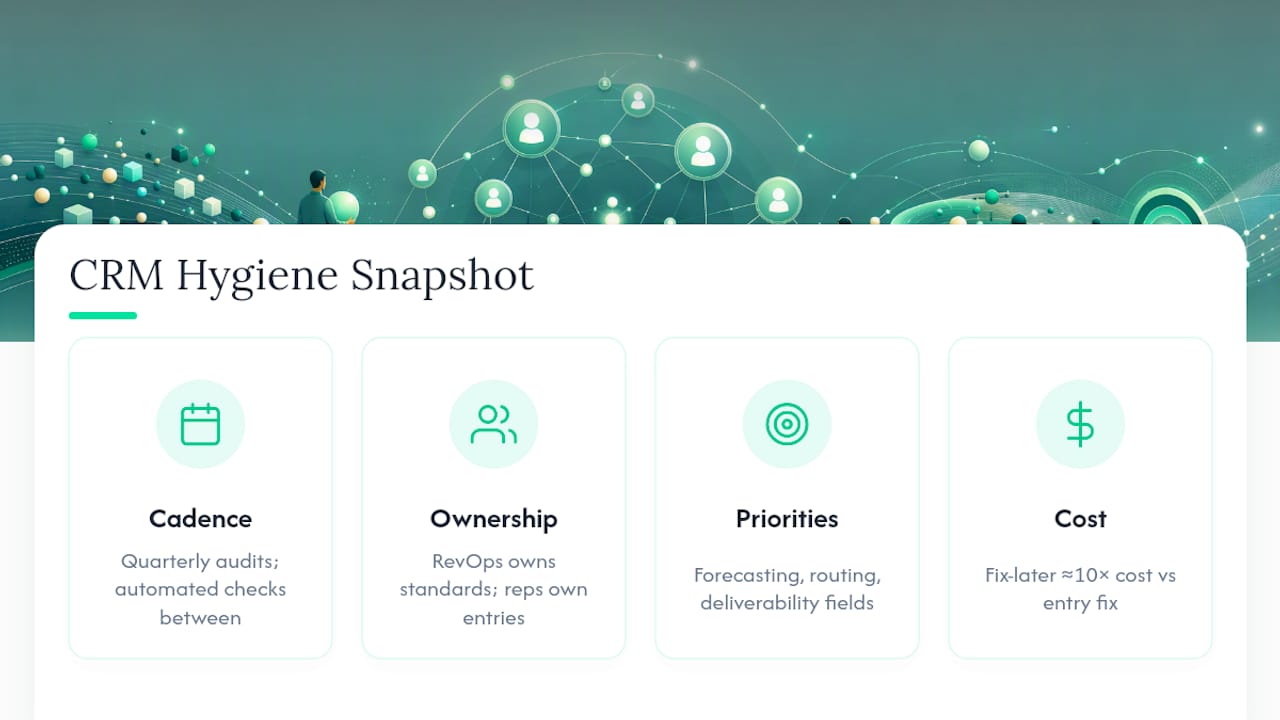
Where most teams go wrong isn't skipping the audit. It's treating governance as optional once the audit's done. Ownership has to be explicit: RevOps sets and maintains the standards, reps own what they type into the record on any given day. Skip that split and the same cleanup repeats every year, at real cost, since the fix-later price tag runs roughly ten times higher than fixing it at entry.
If you take one thing from this, prioritize the fields tied to forecasting, routing, and deliverability before you touch anything cosmetic. A messy "notes" field never lost anyone a deal. A wrong close date, on the wrong record, routed to the wrong rep, absolutely has.
— Bernard
Ready to Stop the Revenue Leak.
Running the 30/90/180 playbook by hand works, but it takes a person watching dedupe flags, bounce rates, and stale records every week, time most SMB teams don't have lying around. Some revenue intelligence platforms automate the monitoring layer of that framework: flagging duplicate and incomplete records, catching churn risk before it costs you an account, and recovering missed calls without a rep having to remember to log them.

Signal Engine gives small and local businesses 31 AI-powered tools to score leads by buying intent, predict churn before it happens, auto-generate email and SMS campaigns, and recover missed calls automatically, all in one dashboard starting at $49/month.
Start your free 7-day trial, no credit card required. Setup takes 5 minutes.
Sources
- Only 3% of a Company’s Data Meets Basic Quality Standards (Harvard Business Review)
- A review of the data cleaning pipeline (arXiv)
- CRM Data Hygiene: The 4-Part Framework | Inveo
FAQ
Is CRM Used for Data Cleaning?
A CRM stores and organizes customer data, but it doesn't clean itself. Most platforms include basic deduplication tools, but real data cleaning, standardization, validation, enrichment, requires dedicated processes or automation layered on top.
What Is Data Hygiene in a CRM?
CRM data hygiene is the ongoing practice of keeping customer records accurate, deduplicated, formatted consistently, and current, as opposed to a one-time cleanup. It includes standardization, deduplication, validation, enrichment, archiving, and governance run on a regular cadence.
What Role Does a CRM Play in Data Management?
A CRM acts as the central system of record for customer and prospect data, feeding forecasting, routing, and automation. Its value depends entirely on the accuracy of what's entered, which is why data management and hygiene practices matter as much as the software itself.
What Are the Four Pillars of CRM?
The four commonly cited pillars are contact management, sales pipeline tracking, customer service and support, and marketing automation and reporting. Data hygiene underlies all four, since dirty data weakens every one of those functions equally.
How Often Should You Run a CRM Data Cleanup?
A quarterly deep clean paired with lighter weekly or monthly automated checks balances thoroughness with the reality of ongoing data decay. Waiting a full year between cleanups typically lets duplicate rates and stale records compound past the point of an easy fix.